


   |
| uCoz Community » uCoz Modules » Additional Features » FTP connection (uploading of files via FTP) |
| FTP connection |
FTP (File Transfer Protocol) is a standard network protocol used to transfer files from one host to another host over a TCP-based network, such as the Internet (Wikipedia). To use FTP you will need a special program - an FTP client, e.g. Filezilla, CuteFTP, FTP Commander etc. A browser cannot be used for this purpose. You can get additional info on these and other programs with the help of search engines (Google, Yahoo! etc.). Learn how to setup FTP on uCoz and connect using a FTP client (guide by TeamNiBiC) 1. Sign in to your Control Panel (http://example.ucoz.com/admin) 2. At the main page, click on FTP details. 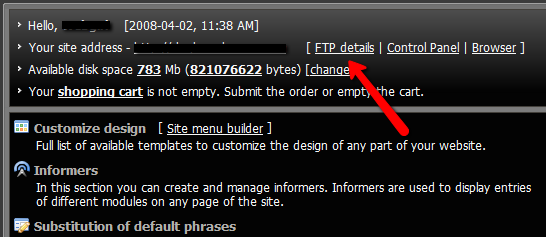 3. A window will appear, where you will find: host, login and password. If you haven't set the password yet, click the link and set one. 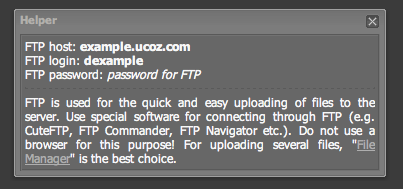 4. Save the information or at least keep the window open for you to log in using your favorite client. I recommend Filezilla, which can be found by Google: Filezilla download. 5. Install and launch the client and sign in with your information. For FTP programs to work properly you should check your network settings, the settings of firewall and antivirus software. It is desirable to look into the error log. If the connection to the server was established, an error will be clearly described. If there is no connection then there is something wrong with the network or client settings. You may often need to use the passive mode, if your ISP sets limitations. ATTENTION! To establish an FTP connection you should observe the following conditions: 1. Your e-mail must be confirmed. 2. Your website must be at least 2 hours old (sometimes up to 24 hours) for FTP to work. 3. The installed security programs must not forbid FTP connection. 4. The passive mode must be selected. 5. Enter the data into your FTP client manually, and not by means of copy&paste. Static .htm and .html files should be uploaded via File Manager. Static files are not very welcome at uCoz. If you need them more then 10 you have chosen a wrong hosting. COMMON RULES FOR FTP AND FILE MANAGER - The max size of a file to upload is 15 Mb. - The max length of a file name with extension is 45 characters. - One nesting level can have not more than 200 files and folders (max nesting depth is 4). - A file name can contain only Latin letters, digits, an underscore and a hyphen. See how to work with FTP here Attachments:
0267777.png
(27.5 Kb)
·
6921784.png
(23.8 Kb)
I'm not active on the forum anymore. Please contact other forum staff.
|
Hello, I am having problems with uploading via ftp (FireFTP) html files, I have read on this forum that other people have the same problem. I would like to know about dynamic and static files and why the ftp files can't be uploaded by my ftp program. I know html files can be uploaded by file manager but I prefer my 'FireFTP'.
Any help would be much appreciated. Ray... |
1. FTP is discussed here - http://forum.ucoz.com/forum/37-2500-1
2. About static and dynamic pages - http://forum.ucoz.com/forum/8-2093-1 3. .htm and .html files CAN'T be uploaded via FTP, it is not allowed and you can't change this fact. All other questions about FTP go into the mentioned thread about FTP. I'm not active on the forum anymore. Please contact other forum staff.
|
I too unable to connect - filezilla - been using it for years - all login details are correct and I have verified the password.
Will try agin later and see if there is a registration delay as per Micky above. Post edited by DoesItMatter - Wednesday, 2009-11-25, 10:24 PM
|
Hey
 So it's really impossible to upload a .htm file? I wanted to use Facebook Connect with my site, but this operation needs a file "xd_receiver.htm" to be uploaded to the root-dir of the website.. which appear to be impossible. So, no Facebook Connect?? So it's really impossible to upload a .htm file? I wanted to use Facebook Connect with my site, but this operation needs a file "xd_receiver.htm" to be uploaded to the root-dir of the website.. which appear to be impossible. So, no Facebook Connect??  or is there some kind of other way? (C'mon guys, facebook!?) or is there some kind of other way? (C'mon guys, facebook!?)
|
smladenoff,
Quote (Sunny) Upload .htm and .html files via File Manager. Static files are not very welcome at uCoz. If you need them more then 10 you have chosen a wrong hosting. "I don't like to commit myself about heaven and hell - you see, I have friends in both places"
|
Quote (Tommy) smladenoff, Quote (Sunny) Upload .htm and .html files via File Manager. Static files are not very welcome at uCoz. If you need them more then 10 you have chosen a wrong hosting. 1. I don't have any .htm? files, because I can't upload any. Quote (Sunny) 8. Before you continue to create email addresses you must verify that you own domain.com. Google will suggest 2 methods, I advise you to choose the 1st one. Create a file with the suggested name (create a .txt file with the verification code and save it in .html format, then upload the file via File Manager to the root folder). So? I can make the difference between "File Manager" and "FTP Upload", but you shouldn't answer in a matter you aren't familiar with in such arrogant way. I even didn't knew that until today, when I read on how to manage Domain Transfer. You should've told me that, not the stuff you gave me. |
Quote (smladenoff) So it's really impossible to upload a .htm file? I wanted to use Facebook Connect with my site, but this operation needs a file "xd_receiver.htm" to be uploaded to theroot-dir of the website.. which appear to be impossible. So, no Facebook Connect?? For your question, I answered, you can upload .htm and .html files via "File manager". What is wrong with it? I didn't even use any arrogant words. Think before you talk. I just pointed out that you can upload .htm file. Rest is up to you to find out. I can't babysit you here. Don't tell me where I should answer, you are not my boss. Stop crying and improve your knowledge and reading skills. Yes, now I'm arrogant. "I don't like to commit myself about heaven and hell - you see, I have friends in both places"
|
Hi to all.
I realy need some help,as a total green horn Iám at the end of my possibilitys to solve on my own the problems mentioned below. can someone tell me how to proceed after succesfull upload into the file manager???? I hope someone can help me out,I hope so. Kind regards Chris |
Candy, I do not see how your question is related to FTP uploading, as well as it is not really uCoz-related.
Quote (Candy) can someone tell me how to proceed after succesfull upload into the file manager???? I uploaded my weather station data and all is within the file manager how do I get it into my disired page I am not sure what kind of data it is. In general - use the links from File Manager and some HTML codes.
Quote (Candy) and how can I arrange that the data to upload will go directy into this page ?????? Probably using a script. I'm not active on the forum anymore. Please contact other forum staff.
|
Hi Sunny,
Ok thanks for you reaction I will try to exlpane. I load up my ftp files that goes good but the files are going into the file manager and I do not know how to get them from there on the right page I made a extra page called test into the navigation panel . Further I would like to arrange that i can upload directly into the page I want my files are the data from my weather station,and i would like to update my files lets say every 10 minits or so . Your tip using a script I have no idee how and where i can do that in the file manager can I find info about that ????? Is there a way you can help me with this, Cheers Chris Post edited by Candy - Friday, 2010-01-22, 10:37 AM
|
Candy, you did not answer what type of data - what file extensions do those files have?
Quote (Candy) Further I would like to arrange that i can upload directly into the page I want my files are the data from my weather station,and i would like to update my files lets say every 10 minits or so . So I guess you want the data to be updated automatically? Then only a script.
Quote (Candy) Your tip using a script I have no idee how and where i can do that in the file manager can I find info about that ????? You will not find info in File Manager 'cause it is custom coding that requires good coding skills. And I am afraid I cannot help you here. I'm not active on the forum anymore. Please contact other forum staff.
|
Hi Sunny,
Iam green as grass according this stuff. Ok my weather station makes data html files and changes that into htm and then after that the ftp files are send to that ftp host But how do I put this on my page now ?? So the question how do you get your files after ftp upload from the file manager to the page you want ??? Sorry I hope that i have explaned it well as my knowledge from web building and html is poor and Englisch is not my native language. Thanks in advance Kdrgds Chris Added (2010-01-23, 5:39 Am) It was not possible to help me in the first place BUT thanks to what YOU wrote I finaly solved my problem. For others with such problem doint hesitate to ask. Kind regards Chris |









 Hi Sunny
| |||