


   | |
| Forum moderator: bigblog |
| uCoz Community » For Webmasters » Design Customization » Builder (A short video guide) |
| Builder |
Here is short video about this new feature - Builder. Builder allows to easily add/edit blocks on your website and change their display order in visual mode. By means of this feature you can quickly select content for your blocks - scripts, widgets, menus, video, audio, RSS, HTML code. This feature is installed by default for all new websites. If your website was created before the global update you can enable Builder in Control Panel -> Common settings -> Use "Builder" for the website design customization. Minor Builder Update If the Builder option is missing on your Admin Bar, you need to go to the website Control Panel -> Users -> User groups -> Administrators -> Other, and enable the option "Edit site design". After the update there will be two separate options in the user group permissions: 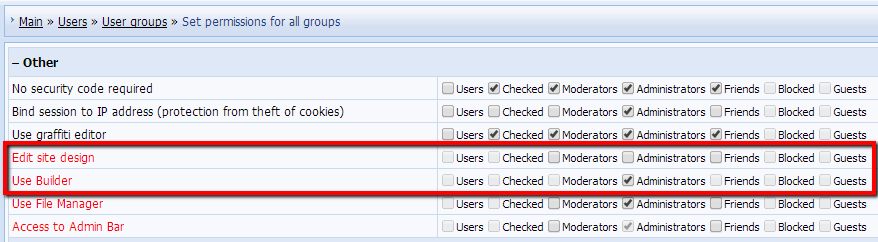
Note: if you disable the option "Use Builder" and enable "Edit site design", and then also disable the option "Use "Builder" for the website design customization" in Control Panel -> Settings -> Common settings, the Design tab will appear on your Admin Bar and you will be able to access all website templates or separate page templates via the Admin Bar: 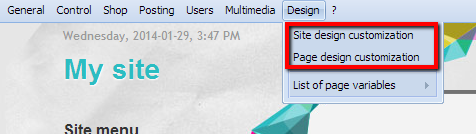 I'm not active on the forum anymore. Please contact other forum staff.
|
akash19, CP -> Customize Design -> select a template -> click "Restore default template" in the top right corner. You can also simply reselect your design in Common Settings. Also note that you will lose all design modifications after restoring.
I'm not active on the forum anymore. Please contact other forum staff.
|
Quote (Sunny) if you are using a default design then try to restore default templates. Also provide website url. Web design and film == my 2 passions.
Genesis Inc. ~ New Horizons, New Beginnings |
Quote (NTP) isn't there some way to restore the whole design at once? Yes, there is. Reselect the design in Common Settings. But you'll lose all design modifications in this case. Create a templates backup, then restore the design and see whether the builder will work. I'm not active on the forum anymore. Please contact other forum staff.
|
Dawgg, he meant restoration of templates. This can be done in Control Panel -> Customize Design. You can also add the missing blocks via Builder manually.
Quote (Dawgg) but what else is needed? Almost everything. Just think twice before you delete anything. I'm not active on the forum anymore. Please contact other forum staff.
|
I have question, I wanted to use the widget menu thingy where I can add special menu with my own buttons, but it wont let me add navilinks.
Added (2009-12-25, 5:32 Pm) Added (2009-12-25, 5:35 Pm) |
Dawgg, see the following - http://forum.ucoz.com/forum/8-5638-46870-16-1259922388
Killer047, it is a paid service - http://forum.ucoz.com/forum/37-2705-1 I'm not active on the forum anymore. Please contact other forum staff.
|





 , but its worth it, I love ya guy/gals. UCOZ 4eva!!!!!!!!!!!!!!!!!!!!!!!!!!

| |||