


   |
| uCoz Community » uCoz Modules » Site Users » User groups (group colors, how to change a user group) |
| User groups | ||||
User Group Colors in Forum If you use the default CSS (CP -> Customize design -> Style sheet (CSS)), then Administrators are red, Moderators are blue, Checked are green and this is set by the following lines: Code /* User Group Marks */ a.groupModer:link,a.groupModer:visited,a.groupModer:hover {color:blue;} a.groupAdmin:link,a.groupAdmin:visited,a.groupAdmin:hover {color:red;} a.groupVerify:link,a.groupVerify:visited,a.groupVerify:hover {color:green;} /* ---------------- */ The Users group is not indicated here and its color is assigned by the first lines of the CSS file, it's the color of the ordinary links on a website. If you want to use your custom color for Users, then add a line for groupUser. Code a.groupUser:link,a.groupUser:visited,a.groupUser:hover {color:#A8C9E2;} A color may be assigned both by an English name and an RGB hex code. Each newly created group has the designation groupOther1, groupOther2 and so on up to groupOther8, as you can add 8 custom groups. Code a.groupOther1:link,a.groupOther1:visited,a.groupOther1:hover {color:Yellow;} a.groupOther2:link,a.groupOther2:visited,a.groupOther2:hover {color:DarkCyan;} A group number in this case means the order of adding, and not a group ID. groupOther1 is the 1st group you create. E.g. uCoz has Users, Administrators, Moderators and Checked as the default groups. If you create a group other than the default groups then this group will be groupOther1. If you create a second group other than default ones then this group will be groupOther2 Other Color Classes On the Forum main page: 1. Greetings to our new member - class="lastUserLink" (if it is not assigned, then it has the color of an ordinary link) 2. Happy Birthday! - class="userBirthdayLink" (similarly) 3. Forum moderator - class="forumModer" (similarly) 4. Thread author - class="lastPostUserLink" (similarly) The same classes as in p. 3 & 4 apply inside the Forum, on pages with sections and forum boards. On the page with posts: 1. Forum moderator – class="forumModer" 2. User nickname - class="postUser" 3. Group name - class="postUserGroup" - Attention! It’s not a link, but a plain text and the class applies to both words – e.g., group: Moderators. On the website: On the website group names are also determined by the classes groupModer, groupAdmin, groupUser etc. When changing a group color, check whether the page template has the address of the file where you make changes. The following line must be in the template: Code <link type="text/css" rel="StyleSheet" href="http://YOUR_SITE_ADDRESS/_st/my.css" /> Username Colors in Posts How to display the colors, set for certain groups, in thread posts? Go to Customize Design -> Forum -> Appearance of entries, find this: Code <tr><td width="23%" class="postTdTop" align="center"><a class="postUser" href="javascript://" onClick="emoticon('[b]$USERNAME$[/b],');return false;">$USERNAME$</a></td> and change it for this: Code <tr><td width="23%" class="postTdTop" align="center"><a class="postUser$GROUP_ID$" href="javascript://" onClick="emoticon('[b]$USERNAME$[/b],');return false;"><span class="forum_nik$UID$">$USERNAME$</span></a></td> Save the template, go to Style sheet (CSS), and add the following lines there: Quote a.postUser1 {color:#000000;} – color of group 1 a.postUser2 {color:#00FF00;} - color of group 2 a.postUser3 {color:#0000FF;} - color of group 3 a.postUser4 {color:#FF0000;} - color of group 4 and so on for each group (if you have more than four groups). Note: Do not put the text in blue (color of group n)! Then you can also assign a certain username color to a definite user, just add the following to the CSS: Quote .forum_nik1 {color:#F6F6F6;} – username color of the user with ID=1 .forum_nik6 {color:#F7F7F7;} - username color of the user with ID=6 .forum_nik7 {color:#F9F9F9;} - username color of the user with ID=7 .forum_nik4 {color:#A6A6A6;} - username color of the user with ID=4 Thus you can assign colors to each group and at the same time assign personal username colors to certain users. I'm not active on the forum anymore. Please contact other forum staff.
| ||||
Quote (Metalstorm) <?if('$USER_GROUP$="Administrators"')?><a title="$USER_GROUP$"><img src="http://s101.ucoz.net/img/fr/admin.gif"></a><?else?><?if('$USER_GROUP$="Moderators"')?><a title="$USER_GROUP$"><img src="http://src.ucoz.com/img/fr/moder.gif"></a> <?else?>$USER_GROUP$<?endif?><?endif?> You want to use the
Quote <?if($GROUP_ID$="1")?><a title="$USER_GROUP$"><img src="Link to image for group 1"></a><?endif?><?if($GROUP_ID$="2")?><a title="$USER_GROUP$"><img src="Link to image for group 2"></a><?endif?><?if($GROUP_ID$="3")?><a title="$USER_GROUP$"><img src="Link to image for group 3"></a><?endif?><?if($GROUP_ID$="4")?><a title="$USER_GROUP$"><img src="Link to image for group 4"></a><?endif?><?if($GROUP_ID$="5")?><a title="$USER_GROUP$"><img src="Link to image for group 5"></a><?endif?> Notice the <?if($GROUP_ID$="1")?> This finds out if the User is in Group 1, If the user is in that group it will show the image you set for that group... Understand now? Use your brain before you post ~Lee
Please use search, ~Lee Post edited by iLee - Monday, 2009-02-23, 10:22 PM
| ||||
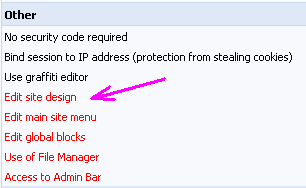 It can be enabled for moderators and administrators only. Be attentive with this permission and give it to the users you trust! Attachments:
0790567.png
(4.5 Kb)
I'm not active on the forum anymore. Please contact other forum staff.
| ||||
Quote (Sunny) Username colors in posts Save the template, go to "Style sheet (CSS)", and add the following lines there: Code a.postUser1 {color:#000000;} – color of group 1 a.postUser2 {color:#00FF00;} - color of group 2 a.postUser3 {color:#0000FF;} - color of group 3 a.postUser4 {color:#FF0000;} - color of group 4 and so on for each group (if you have more than four groups). I do not understand that part. I only get my groups colored in forum is viewed by box. They don't get colored in in the post. How do i get them to color up the group in the post? And how do i change the color of the names within those groups. I think the quoted part explained it, but i dun get it. please help thx. I just put in the CSS and Quote (Sunny) How to display the colors, set for certain groups, in thread posts. Go to Customize Design -> Forum -> Appearance of entries, find this: Code <tr><td width="23%" class="postTdTop" align="center"><a class="postUser" href="javascript://" onClick="emoticon('$USERNAME$,');return false;">$USERNAME$</a></td> and change it for this: Code I did that. Please help! Thank you! Post edited by TeamV2 - Sunday, 2009-04-12, 7:17 AM
| ||||
Quote (TeamV2) I did that. Please help! Thank you! Also be sure you replace code properly. If you deleted whole row, you deleted the row
Quote (Only this) <tr><td width="23%" class="postTdTop" align="center"><a class="postUser" href="javascript://" onClick="emoticon('$USERNAME$,');return false;">$USERNAME$</a></td>
Quote (If you deleted row, than this code, which is too much) <tr><td width="23%" class="postTdTop" align="center"><a class="postUser" href="javascript://" onClick="emoticon('$USERNAME$,');return false;">$USERNAME$</a></td><td class="postTdTop"><?if($AWARDS_DO_URL$ && $USER_LOGGED_IN$ && $CUR_USER_ID$!=$UID$)?><div style="float:right"><a href="javascript://" onclick="new _uWnd('AwD','Give award',380,200,{autosize:1,maxh:300},{url:'/index/55-$UID$-28-forum-$FID$_$TID$_$ID$_16_$TIMESTAMP$'}); return false;"><img src="http://s102.ucoz.net/img/icon/thumbu.png" width="13" border="0" title="Good post"></a> <a href="javascript://" onclick="new _uWnd('AwD','Give award',380,200,{autosize:1,maxh:300},{url:'/index/55-$UID$-47-forum-$FID$_$TID$_$ID$_16_$TIMESTAMP$'}); return false;"><img src="http://s102.ucoz.net/img/icon/thumbd.png" width="13" border="0" title="Bad post"></a></div><?endif?>Date: $WDAY$, $DATE$, $TIME$ | Message # $NUMBER$</td></tr> And again, replace this: Code <tr><td width="23%" class="postTdTop" align="center"><a class="postUser" href="javascript://" onClick="emoticon('<b>$USERNAME$</b>,');return false;">$USERNAME$</a></td> To this: Code <tr><td width="23%" class="postTdTop" align="center"><a class="postUser$GROUP_ID$" href="javascript://" onClick="emoticon('<b>$USERNAME$</b>,');return false;"><span class="forum_nik$UID$">$USERNAME$</span></a></td> | ||||
Quote (Armaros) Of course it wont. Top topic starters is made via informer which means you must modify informer. And member page is under body, which means you can't modify it. so i can't change the color of groups and ID in site page also? But it wont change group color in forum post as well. I can't modifty that too? I made my own member page using informer, not the one in the forums. Post edited by TeamV2 - Sunday, 2009-04-12, 6:16 PM
| ||||
Quote (TeamV2) so i can't change the color of groups and ID in site page also? You can't change IDs. As for colors - it's not clear where exactly you want to change them. Screenshots will help. I'm not active on the forum anymore. Please contact other forum staff.
| ||||
| ||||
What is the user group icon pixel dimmension?
| ||||
Quote (PurpleBisch) What is the user group icon pixel dimmension? Attachments:
5740290.png
(64.8 Kb)
|








 icon > Site news > uncheck the box that says "Add new entries".
 How to give permission to usergroup in site news section they can use HTML code pane bcz in Main » Users » User groups » Set permissions for all groups this option is not available for checking. bcz it is not visible.

 It wont change color on the member page and the topic starter and etc..

| |||