


   |
| uCoz Community Additional Services Account Management Can't log into Control Panel and other troubles (Control panel features) |
| Can't log into Control Panel and other troubles |
I cannot log into the Control Panel, it says incorrect username or password.
Please use the Control Panel password reminding form: http://www.ucoz.com/main/?a=remind Is it possible for 2 people to be logged into the Control panel simultaneously? Yes, it is. The maximum number of simultaneous logins to the Control Panel is set in security settings of the Control panel. It can be set to the maximum of 4. If there are several administrators on the website, is it possible to track who logged into the Control Panel and when? It can be viewed in "Action log", that can be found in Control Panel -> Security. If I make someone an administrator, will he/she be able to log into the Control Panel and change something there? No. When you make an administrator, it is not necessary to tell him/her the Control Panel password. Even if an administrator knows the password, it cannot be changed without the answer to the secret question. How to change the Control Panel password? You can change the Control Panel password like this: log in to the Control Panel (add /admin to the name of the website, e.g. mysite.ucoz.com/admin) -> Security -> Change account password -> Separate password. In order to do this you will have to be able to answer the secret question as well. 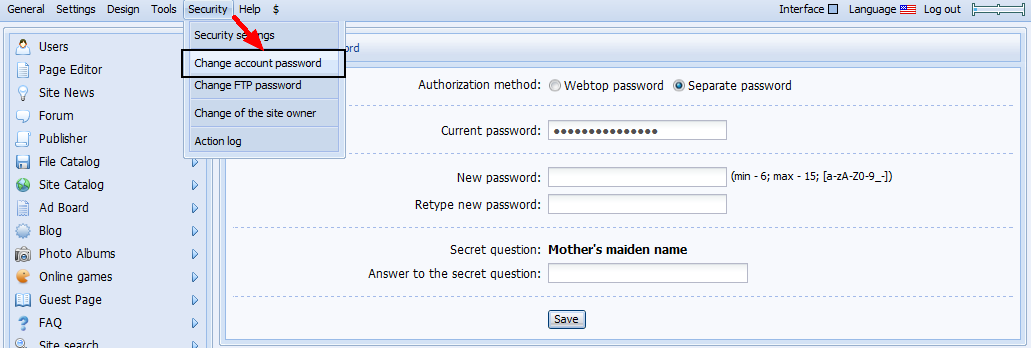 How can I find out when my website was created? The creation date can be found on the main page of the Control Panel. Why can't I create a website backup, if the website occupies more than 75% of the disk space? The remaining disk space is not enough to create a website backup as available Mbs have to be used by the backup copy. |
I can't get into my control panel as it keeps saying password incorrect. It is not incorrect so what is going on?
All I'm trying to do is delete my website and there just is not an easy way to do this! |
sphericmartha, to make sure you are entering the correct password, please use the password recovery form at http://guid.uid.me/remind
I'm not active on the forum anymore. Please contact other forum staff.
|
Hi i know webtop password and administrator password but my site admin panel dont log why?
Added (2016-10-23, 0:01 AM) |
defaultNick0524, please, continue the discussion here: http://forum.ucoz.com/forum/31-20806-1
hey i'm joe and i do not work for the company anymore, please contact tech support for help!
sometimes i lurk here |
Duplicated post. Refer to: http://forum.ucoz.com/forum/31-21004-1
http://moneytobemade.ucoz.com
Post edited by bigblog - Friday, 2017-05-05, 3:14 PM
|
Hello:
My domain is sailingsanblas.ucoz.com. I am getting error when logging in to CP via http://sailingsanblas.ucoz.com/admin: Your current IP address has changed. Session binding parameters can be changed in the section "Security" - "Security settings". Sorry, I don't understand... When I try to log in at http://s2.uid.me/ and enter correct password, that pop-up login screen keeps coming up. Post edited by skipr - Wednesday, 2017-11-08, 5:44 PM
|
skipr, please try to log into the https://uid.me/ instead of http://s2.uid.me/
Most likely, you've set an IP restriction login. |
Thank you, Gromov, but that takes me to http://uid.me/alexander_kamensky2012 and I cannot do anything from there. I cannot open my site, but cannot administer it. And I am still unable to go to CP.
|










| |||

Need help? Contact our support team via
the contact form
or email us at support@ucoz.com.