Sunny

Posts: 9296
Message # 1 |
11:32 AM
2008-09-30
Control Panel » Blog » Module settings Key words: blog settings, blog entries, blog comments, entry sorting, brief version of an entry, uploading of images. | Module name. Here you can enter a name that will be displayed in page title and will be output by means of the $MODULE_NAME$ code. |  | | Blog takes part in uCoz Content Sections TOP and Rating. You can add your blog to uCoz TOP (1). Select blog category (2), enter its name (3) and specify a short description (4). | 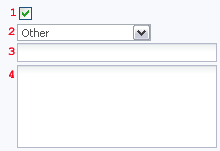 | | Categories menu. By means of these settings you can adjust the work of the $CATEGORIES$ code. 1) Number of columns displayed in a categories menu, 2) Displaying of entries number near the category name. |   | | Number of entries to be displayed. You can assign the number of entries to be displayed on module pages: on blog main page (1), on pages of categories (2), in TOPs (3), in RSS feed (4). You can also select the position of page switchers (5) – at the top (like in site news) or at the bottom (like in the forum). | 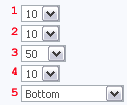 | | Comments. You can allow comments (1) on blog pages, assign the number of comments per page (2), and the position of new comments (3). |  | | Sorting of entries. This setting defines the order of entries. (A) – ascending order (new entries at the bottom), (D) – descending order (new entries at the top) | 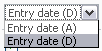 | | Notifications of the administrator. Here you can specify whether to inform you about new entries or comments by e-mail. |  | | Entry rating. After this option has been enabled the users will be able to rate entries. |  | | Fields of a new entry form. Here you can enable/disable (1) fields for the adding of new entries and make them required/optional (2). | 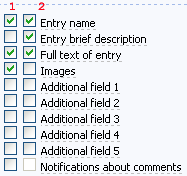 | | Brief version of an entry. If an entry is too long you can enable this option (1) and specify the number of characters for the brief version (2). |  | | Fields sorting. By means of these settings you can set the order of the fields as you like. Use the buttons below to move a field or a separator up (1), down (2) or to add or remove a separator (3). | 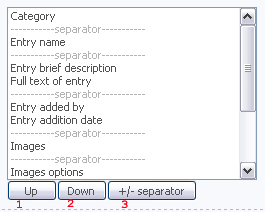 | | Uploading of images to the blog. You can attach images when adding an entry. You can adjust: maximum number of files uploaded at the same time (1), dimensions of a reduced image (2), maximum image dimensions (if an image exceeds the preset dimensions it will be automatically reduced) (3), maximum image size (in kilobytes) (3). | 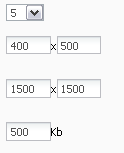 | | Module fine settings. 1) Capability to choose an entry date – an added entry may be displayed not immediately but on a definite day (e.g. in a week). It will be displayed automatically. 2) Always on top – entries with this mark (which is enabled when adding an entry) will be at the top of the page. 3) "Always on top" flag functions only in categories – in categories an entry with the "Always on top" mark will be displayed at the top of the page, and on the main page it will be among other entries. 4) Enable capability to search entries of a particular user – it is possible to find entries added by a particular user. | 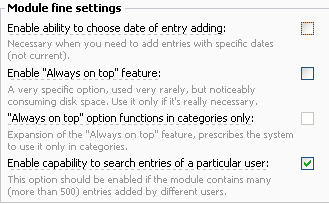 |
I'm not active on the forum anymore. Please contact other forum staff.
|







