


   |
| uCoz Community Additional Services Account Management Backup (how to create a backup copy of your site) |
| Backup |

To restore data from a backup copy you must contact Technical Support via your Control Panel. You can create backup copies from 00 a.m. till 09 a.m. only (server time). If you remove a backup copy via Control Panel the disk space is recounted immediately.
I'm not active on the forum anymore. Please contact other forum staff.
|
hi guys i have a backup file(zip) in my pc from my old ucoz site and i wanna restore it to my now one...can u please tell me how to do it??it says smth about a root folder but i dont see anything like that...thank you!!
|
Quote (Sunny) Attention! To restore data from the backup copy you must have active payment for disk space expansion for the period of 3 months or more Sunny, I don't know about this so good, but I can see this screen, but I didn't pay for disk space And one more question, what to do if I want to restore a backab which is more than 15 Mb? I can't upload so big file to site. And if I want to restore because of the bugs on my site, can I do it for free? Waiting for answers, thanks Attachments:
2264006.jpg
(31.5 Kb)
|
jackass, I have updated the info in the first post. After the update no payment is needed. You now need to contact Tech.Support and explain why you need restoration.
Quote (jackass) And one more question, what to do if I want to restore a backab which is more than 15 Mb? Upload it to a file hosting service (that gives direct links) and inform Tech. Support. I'm not active on the forum anymore. Please contact other forum staff.
|
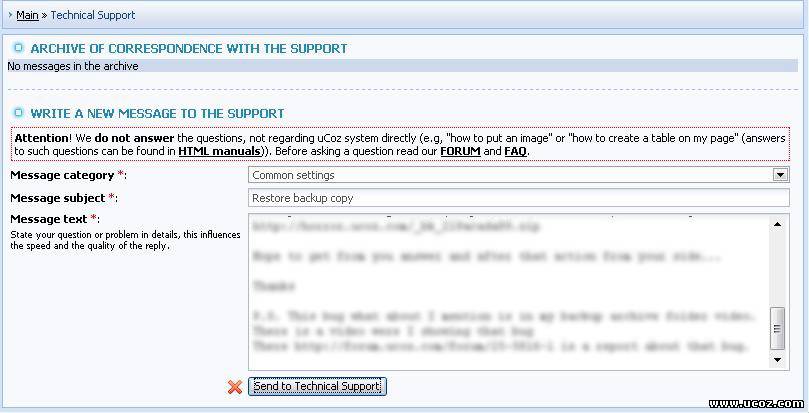
Sunny, I fill up all required fields for contacting Tech.Support , but I can't send it...
Attachments:
9111852.jpg
(79.2 Kb)
|
Quote (andiqu) I created a backup of a template. I downloaded it, now I want to upload to another site, how can I do that? Upload it to File Manager -> '_tbkp' folder. Then go to Templates backup section and click 'Restore'. I'm not active on the forum anymore. Please contact other forum staff.
|
i had taken a backup of my site around 8 months ago,but the forum has grown alot and changed a few templates,so i was gonna take up an updated backup of the forum and like a dumbaXX i deleted the old backup first,now i cant figure out how to take backup again.i did a template backup and stored it on my pc,now i need the data base backup and cant figure out how,i also dont understand the hours of being able to take backup,whats: Backup copy can be made from 00 a.m. to 09 a.m.,dont know 00a.m???.and is this eastern?ty for your time.
|
diablo67, read this to know information about Backup http://www.forum.ucoz.com/forum/31-3046-1
Quote (diablo67) whats: Backup copy can be made from 00 a.m. to 09 a.m.,dont know 00a.m???. If you are not sure of the time, you can always see the server time on "control panel - Backup" 
Attachments:
0512040.jpg
(5.5 Kb)
"I don't like to commit myself about heaven and hell - you see, I have friends in both places"
|
Don't copy paste other user's post. You did that here too http://www.forum.ucoz.com/forum/31-7018-54603-16-1271132787
"I don't like to commit myself about heaven and hell - you see, I have friends in both places"
|
While restoring backup i get theses errors
I get this error when I try to restore my website from backup.Any idea how to fix it?? These things are shown in log. Code Checking 'forum' table...ok Checking 'forump' table...ok Restoring 'forum' table...ok Restoring 'forump' table...ok Restoring data of 'forum' module...ok Restoring files of 'forum' module...ok Checking 'news' table...TABLE VERSION 29!=30, using translation..ok Restoring 'news' table...ok Checking 'comments' table...INCORRECT TABLE VERSION (13!=16) There is some problem in comments table.I don't understand how to fix it.Techincal support also not reply me and closed my ticket.What should i do?? |
warezparadise, you did not answer the following questions:
Quote (Natashko) warezparadise, did you check the boxes with the modules you now have problems with while restoration? Did you activate those modules before data backup restoration? I'm not active on the forum anymore. Please contact other forum staff.
|











| |||

Need help? Contact our support team via
the contact form
or email us at support@ucoz.com.