


|
   |
| uCoz Community uCoz Modules Additional Features Search Engine Friendly URLs (what it is and how to use) |
| Search Engine Friendly URLs |
What is a SEO Friendly URL
Friendly URL is a feature that allows to create search engine friendly URLs. E.g. if you add an entry named "Name", the system will insert this name into URL, and you will get not: http://site_address/news/2009-08-21-1, but: http://site_address/news/name/2009-08-21-1[/j] How to use this feature? It can be enabled/disabled in Common Settings:
 If we add an entry (let it be a file entry) named "Example" we will get the URL: http://site_address/load/example/1-1-0-1 example can be changed into any other word/phrase and it is not necessary to change the entry name to do this – just enter the necessary word/phrase into the field "The name to be displayed in URL:" when editing an entry:
 Friendly URL is used in the same way in Page Editor, i.e. if we add a page named "Name" we will get the URL: http://site_address/index/name/0-1 Friendly URLs are also used in module sections and categories.E.g. let’s take File Catalog – go to "Categories management", click
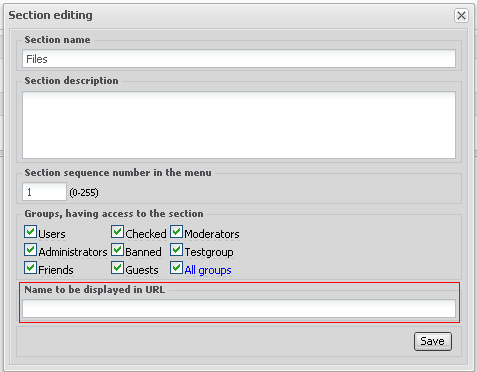 Enter a name to be displayed in the URL and you will get not http://site_address/load/1, but http://site_address/load/name/1 The section/category will be available by the old address as well. Question-answer: Q: I enabled friendly URL, then disabled it. The links to the entries with friendly urls will stop working? I'm not active on the forum anymore. Please contact other forum staff.
|
I just noticed from entries made from september1 2009, the url are seo friendly like
Code http://www.coredownloadz.ucoz.com/wallpaper_robinleathal_v6020/2009-08-30-594 But old entries same seo unfriendly urls . Won't they change to the one like the new seo friendly urls? Again, still the image uploaded even today have still unfriendly url. Why ucoz didn't thought its important? |
Quote (guitarmantra) But old entries same seo unfriendly urls . You need to edit old entries and the urls will change.
Quote (KarlisLV) I created new page whit radio. I added in friendly url radio, and it show - index/radio/0-68! Is there some way to make it show only domain.ucoz.com/radio or domain.ucoz.com/index/radio whit out 0-68! No. Those numbers are important for the system work and can't be removed. I'm not active on the forum anymore. Please contact other forum staff.
|
i edited my site news category link from
Code http://gamejungle.co.cc/news/1-0-2 Code http://gamejungle.co.cc/news/highly_compressed_best_direct_link_pc_games/1-0-2 but the address of entries under this category is same as before. ex. Code http://gamejungle.co.cc/news/entry_name/2009-10-29-361 i want to change all the addresses of all entries under this topic to be changed. if its not appropriate zone than move the quesion to general questions. |
akash19, activate option Friendly URL,Control panel -> Settings -> common settings and check Friendly URL .
ExtraCafe.rs, we're the best !
|
The uCoz's friendly URLs use underline instead of hyphen (
Code http://exemplo.ucoz.com.br/news/como_cuidar_bem_do_gato/2013-11-27-4 To Code http://exemplo.ucoz.com.br/news/como-cuidar-bem-do-gato/2013-11-27-4 Hello! I am Ennio Sousa
Post edited by BraziluCoz - Wednesday, 2014-07-02, 3:07 PM
|
BraziluCoz, no, definitely not in the near future. While hyphens are indeed better, the difference is not so important, and underscores do not cause problems. Look at Wikipedia, for example, it uses underscores.
I'm not active on the forum anymore. Please contact other forum staff.
|



 near the necessary section or category:







| |||
| |||
