


   |
| uCoz Community uCoz Modules Site Users User Ranks and Titles |
| User Ranks and Titles |
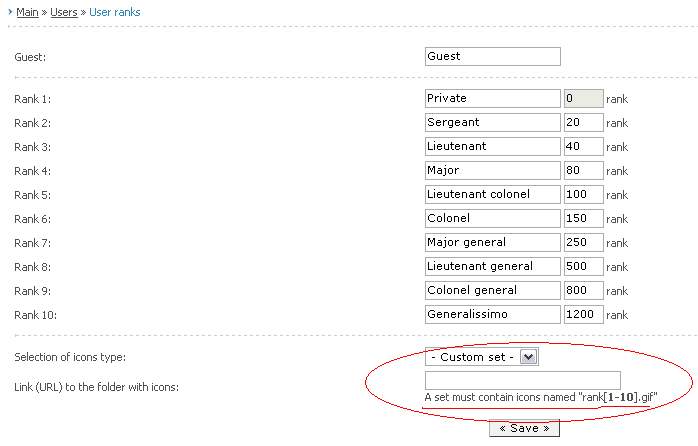
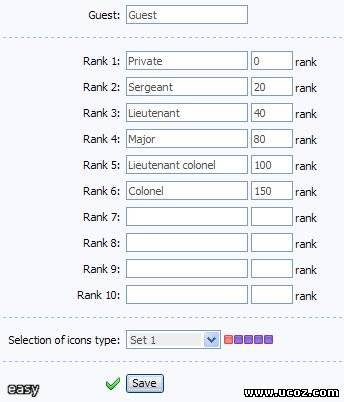
You can edit ranks here – Control Panel » Main » Users » User ranks.
There are 10 ranks + Guest. You can write your own name for each rank including Guest. An empty field will be filled in with a default rank when saving. You can assign an image to each rank either from a default set or from your custom one. A custom set must contain icons with the names "rank[1-10].gif". They are placed in the special field which appears only after you have chosen "Custom set". You must specify full address to the folder with rank images - http://your_site.ucoz.com/your_folder/. Images should be uploaded to the site beforehand via FTP or File Manager, not as an archive but as separate files.
Ranks are assigned according to the number of forum posts.
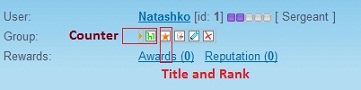
 Personal rank, named "User’s title" appears in the forum and in a Profile by default instead of a rank, and group image (in the forum) instead of a rank image. To insert an image instead of text in a Title you should write the following in the field: Personal rank, named "User’s title" appears in the forum and in a Profile by default instead of a rank, and group image (in the forum) instead of a rank image. To insert an image instead of text in a Title you should write the following in the field:
Code <img src="full_address_of_custom_image"> It is advisable to have a short address because there is a limit on the number of characters in the field. If you want to output both group image and rank image then edit the template of entry appearance (you should first enable it in Forum Settings). You can change ranks in the Control Panel by changing number of messages, therefore ranks are assigned according to the number of messages in the forum. If you want both a rank and a title being displayed then go to Control Panel - Forum – Module design customization – Appearance of entries:
Code <?if($USER_TITLE$)?><div class="postRankName">$USER_TITLE$</div><?else?><div class="postRankName">$USER_RANK_NAME$</div><?endif?> The code shows that either rank or title is displayed, so you should divide this line into two:
Code <?if($USER_TITLE$)?><div class="postRankName">$USER_TITLE$</div><?endif?> <?if($USER_RANK_NAME$)?><div class="postRankName">$USER_RANK_NAME$</div><?endif?> You can assign your own classes.
Question - Answer
Quote Maybe should allow to make more user ranks? 10 ranks is enough, you can't add more....
Quote how do i add custom user rank icons? i put the name of the images rank1 rank2 rank3 rank4 rank5 etc. all the way up to 10. there in gif formate. i put them in a file on my website. i put the url of the file into the custom icon thing in the user ranks. But when i look at the pictures of them on my site. nothing is there What url you put in "Link (URL) to folder with icons"?
Quote Aint it possible to remove ranks, or make it less, cause i don't want, or need 10 ranks
It is possible to change User Title and Rank value in the personal profile:
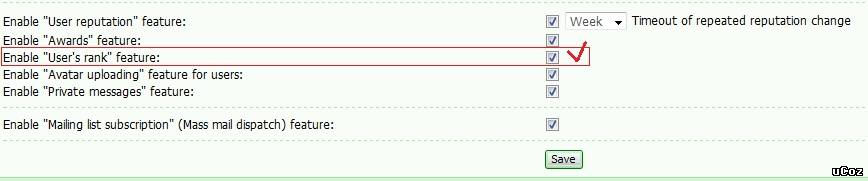
Do not forget that "User's rank" feature should be enabled in Control panel->Users->Module settings
Attachments:
4242900.png
(16.9 Kb)
·
8490155.jpg
(21.8 Kb)
·
9511682.jpg
(11.4 Kb)
·
9533284.jpg
(85.0 Kb)
I'm not active on the forum anymore. Please contact other forum staff.
|
can u give me some website that provide user ranks
i can't find out anyone 
|
You mean the rank images?
If so, you can check this site - http://www.smfforfree.com/starpreview.htm |
can standard members have custom titles like this :
is there any way so that they can edit it themselves from their profile ? like instead of asking mods and admins to do it all the time..the prob is..that my site is growing fast enough @_@ and its a lil of a burden to do it all the time..help please? |
1. Activate one more field in CP -> Users -> Module settings -> Fields of registration form: (e.g. AOL identifier)
2. Rename it in CP -> Substitution of default phrases and in CP -> Customize Design -> User's personal page 3. In Customize Design -> Forum -> Appearance of entries instead of Code <?if($USER_TITLE$)?><div class="postRankName">$USER_TITLE$</div><?else?><div class="postRankName">$USER_RANK_NAME$</div><?endif?> put this Code <?if($AOL$)?><div class="postRankName">$AOL$</div><?else?><?if($USER_TITLE$)?><div class="postRankName">$USER_TITLE$</div><?else?><div class="postRankName">$USER_RANK_NAME$</div><?endif?><?endif?> Now users can add custom titles by means of editing their profiles. I'm not active on the forum anymore. Please contact other forum staff.
|
Can we change the star sets of the forum?
Apart from that can a(Admin) award a custom star to anyone? Post edited by SaadiSherazi - Wednesday, 2009-01-28, 10:30 AM
|
Quote (SaadiSherazi) Can we change the star sets of the forum? a custom set in the same way as icon set: http://www.forum.ucoz.com/forum/5-2525-1
Quote (SaadiSherazi) Apart from that can a(Admin) award a custom star to anyone? |
Ar7, I have already written - forum posts and nothing else. When you say that user ranks still change you are probably judging by your profile - your rank differs only because you are the administrator.
I'm not active on the forum anymore. Please contact other forum staff.
|
Quote (Sunny) Ar7, I have already written - forum posts and nothing else. When you say that user ranks still change you are probably judging by your profile - your rank differs only because you are the administrator. Since I don't use forum module and probably never will can i disable user ranks and how? And is there any other way to select top members of my site according their contribution, average ratings of their contribution, user reputation, etc and display them in a top users list? Post edited by Ar7 - Tuesday, 2009-02-03, 3:09 PM
|
On my website (http://www.sliceanddice.ucoz.com/), ranks aren't assigned according to the number of forum posts.
I've done everything said in User Ranks and Titles Post, but it still doesn't seem to work. Here is a picture of the User Ranks page: http://sliceanddice.ucoz.com/Ranks.bmp But when I save this, the user ranks don't change at all, some people have 1 post and a rank of 4, where others have a rank of 1. Please help! www.sliceanddice.ucoz.com A Medal of Honor + Sniper Elite Clan
Want an updates box on your website? Get it here. Post edited by Tom - Monday, 2009-02-09, 9:02 AM
|
Can I change this so they differ because of forum posts, instead of different groups?
www.sliceanddice.ucoz.com A Medal of Honor + Sniper Elite Clan
Want an updates box on your website? Get it here. |
Tom, ranks are not connected with groups, but with forum posts. It looks like you have changed the ranks manually, try to change them manually back according to the number of posts.
I'm not active on the forum anymore. Please contact other forum staff.
|














| |||
