Domain transfer and email creation - Additional Features - uCoz System management and tuning - uCoz Community
You logged in as Guest
Username/E-mail:
Recent messages · Members · Forum rules · FAQ · SEARCH Registration · Log in


We are in the second round! Let's keep voting!

Page 1 of 10123910»
uCoz Community » uCoz System management and tuning » Additional Features » Domain transfer and email creation (domain.com, domain.net, mail@domain.com, subdomains)
Domain transfer and email creation
SunnyDate: Friday, 2008-03-21, 4:25 Am | Message # 1
Haunter
Group: Administrators
Messages: 2016
Awards: 121
Reputation: 139
Status: Offline
UCOZ technology allows transferring of a domain (of any level) to your site for FREE.

  • - uCoz requires no payment;
  • - uCoz gives possibility of full domain management (creation of subdomains, e-mail accounts etc.);
  • - e-mail accounts are created by means of GMail service;
  • - domain of the second level may be bought at any registrar (e.g. GoDaddy.com);
  • - you’ll be able to register in catalogs, which prohibit registration of free sites;
  • - you’ll be able to enter a serious banner exchange network (or advertising company), where only paid domains are allowed;
  • - with such a subdomain Users will never loose you, even if you change your hosting (e.g. for other server Sх), the address will remain the same.
  • - with such a domain search engines will place you higher in request lists;
  • - one will hardly guess that you have your site in uCoz system. Thus, you will get all uCoz technologies, and others will think that you are a serious web-master.


Question-answer

Quote
Can I attach another uCoz domain to the site?

No, you cannot.

Quote
If I register a new site at uCoz, can I attach it to the subdomain of my domain domen.net, provided I attached it by means of DNS?

Yes, you can. Through the control panel of the site, to which domen.net is attached, add the necessary subdomain, e.g. forum.domen.net, by specifying for it the IP address of the server, where the new site is registered. Then attach forum.domen.net in the control panel of the new site by the third method.

Quote
The specified domain name doesn’t correspond to the uCoz server address. See rules of domain transfer. What does it mean?

As a rule, it means that you should wait. If nothing has changed in a day, then there is some mistake in settings.

Quote
I have the site www.site.net, transferred by means of IP change. I want to attach the forum.site.net subdomain. How can I do it?

One site can have only one domain attached. You should either detach the first one and attach the second, then you can place other content on www.site.net, or create a new site, where the primary site will be www.site.net, and the secondary one - forum.site.net. In this case, databases (of users) will be separate, but they can be merged if both sites are on the same server.

Quote
How can I create a subdomain?

If a domain has been transferred to uCoz servers, then there are links for editing domain records in "Domain transfer" section.

Quote
What should I configure to make uCoz DNS secondary? I want to place primary DNS at registrar, and secondary – at uCoz.

We do not offer such service.

Quote
I have the domain mysite.com, attached by DNS, and I want to attach it to the subdomain test.mysite.com by IP, is it possible?

In terms of transfer by DNS change there is a limitation, that the main subdomain and "www" subdomain will be strictly directed to that uCoz server, where the account belongs. Thus, if you parked the domain at uCoz, you cannot direct the specified 2 subdomains (empty and www) to another hosting.

Quote
A-record was entered at registrar two weeks ago. After attaching the domain, the following appeared "Incorrect DNS-servers specified for the domain: <the list is empty or the domain doesn’t exist>". When one tries to enter the site, it says "site not found". Where is the mistake?

It means that your domain is parked at uCoz, which is incorrect if the domain is not hosted at uCoz. Cancel parking.

Quote
Can several subdomains use one and the same module?

It is not possible to direct several domains to one account, if this is what you mean.

Quote
I want to attach my own domain to the ucoz.com domain but I get the following error.

Specified domain name resolves into incorrect IP address ([81.93.50.66]). Read the rules of domain attachment. sad

The system explains the error... get to CP of your domain and configure your domain as described in ucoz CP.

Quote
Can i change the ucoz domain, e.g.: mysite.ucoz.co.uk to mysiteEtc.ucoz.co.uk. Is this allowed and how?

No, once you have chosen the domain name you cannot change it, you can only create a new account.

Quote
How do i setup my Ucoz web page in my own domain? I did try but failed. I can see this error message:

The domain djcaner.biz has been parked but not yet attached to the account.
Domain has incorrect set of name servers: ns1.hostavrupa.net, ns2.hostavrupa.net
The following list of the name servers must be applied: ns1.ucoz.net, ns2.ucoz.net

The system gives you the answer: You must change the name servers at the control panel of your domain registrar.


When you use the 2nd method your new domain is hosted at uCoz servers. If you use the 3rd method - you just change the domain name (to be more precise you just get one more name for your site because it will be accessible by both names - the new one and the old one) but your domain remains hosted at another registrar's servers. So the difference is in the place where your new domain is hosted - either at uCoz or not.


I'm not "man", "sir" or whatever. I'm female!
About signatures, screenshots etc...
 
SunnyDate: Friday, 2008-08-15, 7:26 Am | Message # 2
Haunter
Group: Administrators
Messages: 2016
Awards: 121
Reputation: 139
Status: Offline
I’ll explain you how to attach a domain step by step by the example of a free co.cc domain (method 2).

1. Register a domain name at co.cc.

2. Specify uCoz name servers in Manage Domain -> Manage DNS section and click Set Up. They say Name server changes may take up to 48 hours to update throughout the Internet.

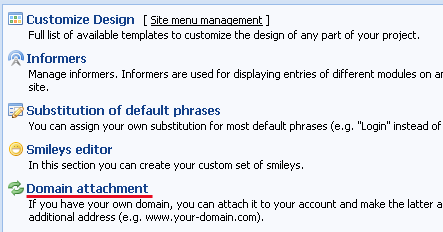
3. Go to uCoz Control Panel -> Domain attachment -> Method 2

4. Enter your new domain name and click “Park domain”.

You’ll see the following message:

6. If everything is ok you’ll see the following in 5 minutes:

7. Click “Attach domain” and in 15 minutes your website will be accessible by a new domain name.

Change all the necessary links (in Site Menu etc.). You uCoz domain will be accessible as well.


SUBDOMAINS

Here I’ll try to explain you how to create subdomains.

-----------------------------------------------

So, you have attached a domain to your uCoz site, e.g. domain.com instead of your previous domain domain.ucoz.com (by method 2).
However, you have another uCoz site (e.g., start.ucoz.com) and you want it to be accessible by the name start.domain.com

By means of uCoz you can create subdomains easily, just follow the steps, described below.

1. Log into Control Panel (domain.com/admin) -> Domain Attachment

2. Choose SIMPLIFIED MODE
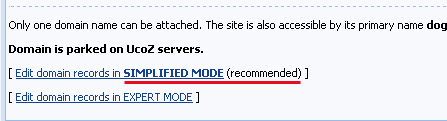
3. You need "SETUP OF SUBDOMAINS"
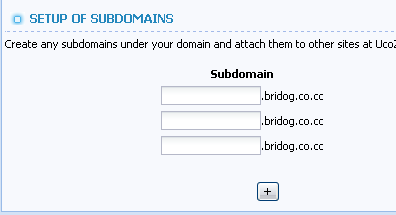
4. Here you can see several fields:

Subdomain. Here you should enter the name of your subdomain (let it be start in our example).

IP address. For start.domain.com to link to your website start.ucoz.com, you must enter IP address of the server where start.ucoz.com is situated (just select the number of the server, let it be s101. You can see the number in Control Panel -> Admin Bar -> General -> Server name). After you have selected the server, IP address will appear automatically in the adjacent field (this is 208.100.61.101 for s101).
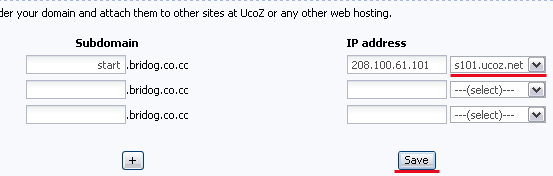
Click ‘Save’. Wait till you see the message "There is no site configured on this address" by the address start.domain.com and then continue.

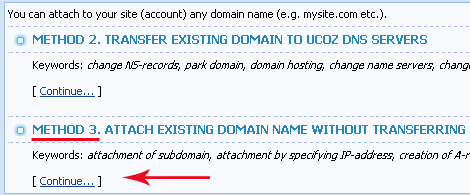
5. Login to the Control Panel of the site start.ucoz.com where you want to attach your new subdomain start.domain.com. Go to ‘Domain Attachment’ and choose Method 3.

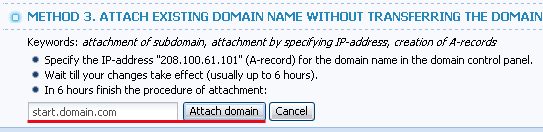
6. Read the information and enter your new subdomain start.domain.com in the field, click Attach

That’s all. Wait for some time and your site start.ucoz.com will be accessible by the name start.domain.com.


I'm not "man", "sir" or whatever. I'm female!
About signatures, screenshots etc...
 
SunnyDate: Friday, 2008-08-15, 8:56 Am | Message # 3
Haunter
Group: Administrators
Messages: 2016
Awards: 121
Reputation: 139
Status: Offline
CREATION OF EMAIL

I’ll explain you how to create emails at your domain: mail@domain.com.
-------------------------------------------------

So you have a domain (e.g. domain.com) that you have attached to your uCoz website by means of DNS ns1.ucoz.net, ns2.ucoz.net (How to attach a domain). And now you want to have email boxes with your new domain @domain.com.

1. Go to Control Panel -> Domain Attachment

2. We’ll work in Simplified mode

3. We’ll use Google Mail service so tick off the corresponding check box under SETUP OF DOMAIN E-MAIL PROCESSING and read the setup instruction.

4. If you still have questions then let’s do this together. Follow THIS LINK, there are two options to choose (Premier Edition and Standard Edition). Let’s choose the second one. Click Get Started.

5. You’ve got your own domain so choose the first variant and enter you domain name in the field. Click Get Started

6. Then you’ll see the registration page.

  • Enter the number of email boxes you need in the first field. If you are not sure about the number don’t worry: you can always request an increase of the number of accounts.

  • Then enter your first name, last name, email, phone and select the country.

  • DNS settings will be automatically configured by the uCoz system so put the corresponding checkmark.

    The other fields are not required so you can just skip them and click Continue.

    7 Then you can create your first administrator account. Choose the name of your administrator email box, enter password and click Continue

    8. Before you continue to create email addresses you must verify that you own domain.com.

    Google will suggest 2 methods, I advise you to choose the 1st one. Create a file with the suggested name (create a .txt file with the verification code and save it in .html format, then upload the file via File Manager to the root folder).

    9. However, your email doesn’t work yet. Go back to Google control panel and find there Email.

    Below you will see the link Activate email by which you will be offered to read instructions. If you are not a specialist you may not even read them. Better go to the Control panel of your site domain.com and click Save (the uCoz system will automatically configure all necessary MX records described in Google instruction).

    Now you can click I have completed these steps.

    Google will check DNS setting within 2 days, and there will appear an inscription Active near theEmail item.

    ------------------------------------------------

    Now your email box is working but it is not very convenient to remember the url http://mail.google.com/a/domain.com. It would be mush easier if your box were available by the address mail.domain.com.

    10. Find Email in Google Apps control panel and click the link. You will see ‘Change URL’ link in the general settings.

    11. Select Custom URL and enter a subdomain for it, let it be mail. Click Continue.

    12. Now you must change DNS records so that the address mail.domain.com were linked to your email box. To do this log in to uCoz Control Panel - Domain Attachment. Now we’ll work in EXPERT MODE.

    13. You will see several fields. As you can see MX records have been already created by the uCoz system. Create a CNAME record in any empty field (note: you must put a dot after the address in the "Value" field). Don’t forget to Save.

    Now get back to your Google control panel and click I’ve completed these steps.

    That’s all. You can now create Google accounts for your users and friends using your own domain name (you may need to wait for some time for the settings to take effect).


    I'm not "man", "sir" or whatever. I'm female!
    About signatures, screenshots etc...
  •  
    HUNARDate: Monday, 2008-08-25, 12:10 Pm | Message # 4
    Newbie
    Group: Checked
    Messages: 10
    Awards: 1
    Reputation: 2
    Status: Offline
    Hello,i live in iraq

    I want to buy a domain On this system UCOZ

    i want to know how to buy it,and i need all the information about it

    I have to buy it but i don't know how to pay money for that,so i want to find a way to pay


    Answer: You can't buy domains from uCoz. All uCoz domains are free. If you want to attach your own domain to uCoz then you should buy it from any other company and then just follow the instructions in Control Panel - Domain attachment. [Sunny]

     
    SunnyDate: Tuesday, 2008-08-26, 3:08 Am | Message # 5
    Haunter
    Group: Administrators
    Messages: 2016
    Awards: 121
    Reputation: 139
    Status: Offline
    Quote
    The domain starchat-fans.com has been parked but not yet attached to the account
    Domain has incorrect set of name servers: ns1.lathost.com, ns2.lathost.com, ns3.lathost.com, ns4.lathost.com
    The following list of the name servers must be applied: ns1.ucoz.net, ns2.ucoz.net

    What does this mean? What I need to do?


    Answer: It means that you must change the set of name servers to ns1.ucoz.net, ns2.ucoz.net at the control panel of the domain registrar (where you have bought your domain).


    I'm not "man", "sir" or whatever. I'm female!
    About signatures, screenshots etc...
     
    ccbDate: Wednesday, 2008-09-10, 6:58 Pm | Message # 6
    Regular
    Group: Checked
    Messages: 52
    Awards: 0
    Reputation: 6
    Status: Offline
    www.co.cc offers free domain name, and it can easy to attacth to ucoz, I have one and it working just very good.

    CyberCowBoy From China
    CyberCowBoy From China(new)
     
    Shinn AsukaDate: Thursday, 2008-10-16, 10:52 Pm | Message # 7
    Newbie
    Group: Users
    Messages: 5
    Awards: 0
    Reputation: 0
    Status: Offline
    Hi can everyone help me?

    I want change mysite.ucoz.com to mysite.co.nr I use domain attachment but msg say like this

    Quote
    The domain mysite.co.nr has been parked but not yet attached to the account

    Domain has incorrect set of name servers:

    The following list of the name servers must be applied: ns1.ucoz.net, ns2.ucoz.net

    but co.nr no have use namesever =,=''

    but why always get this msg?

    Quote
    504 Gateway Time-out

    uCozXSrv/1.4.9
    uCoz Web Services


    Answer: If you use co.nr, than there is no need to attach it & there wont be possible to create mail@site.co.nr [Armaros]

    Answer: co.nr is as far as i know a URL REDIRECTING service so why park it? while you can't. [l2viruz]

    Message edited by Shinn Asuka - Thursday, 2008-10-16, 11:26 Pm
     
    denis19912Date: Thursday, 2008-11-13, 11:09 Am | Message # 8
    Newbie
    Group: Users
    Messages: 9
    Awards: 0
    Reputation: 0
    Status: Offline
    I have a problem too. I have attached the domaina and changed the DNS. Now I have waited 24h and my browser said Address Not Found. Do I need to wait more or what can I do?
    P.S. domainas name is zasluzi.net


    Answer: zasluzi.net works fine for me. It will be your browsers or networks problem. [Armaros]

     
    flashoutDate: Friday, 2008-12-12, 5:42 Pm | Message # 9
    Newbie
    Group: Users
    Messages: 2
    Awards: 0
    Reputation: 0
    Status: Offline
    Hello every one,I like ucoz very much.
    But when I want to transfer my domain name,I find some problem
    After A record ,my own name www.dlcosco.com bbs.dlcosco.com mail.dlcosco.com(all Ok)

    But when I try the method 3.the www.dlcosco.com can not be attached,while the other two can.(tell me:Specified domain name resolves into incorrect IP address. ())
    I'm really confused!

    Message edited by flashout - Friday, 2008-12-12, 5:48 Pm
     
    ccbDate: Friday, 2008-12-12, 6:59 Pm | Message # 10
    Regular
    Group: Checked
    Messages: 52
    Awards: 0
    Reputation: 6
    Status: Offline
    maybe the DNS need some time to update the record. if you just create or modify your A record, you have to wait about 12-24 hours for the new record take effect.

    I have the similar problem in atteched domain to drivehq.com, after I modify the A record of www.xxx.com, and add new A record of mail.xxx.com, the mail.xxx.com take effect immediately, but www.xxx.com is'n, after 24 hours, then both take effect.


    CyberCowBoy From China
    CyberCowBoy From China(new)
     
    flashoutDate: Friday, 2008-12-12, 8:06 Pm | Message # 11
    Newbie
    Group: Users
    Messages: 2
    Awards: 0
    Reputation: 0
    Status: Offline
    But without attached in the ucoz,using the 3 domain names"www,bbs,mail"can all lead to the same web page
    "По данному адресу сайт не сконфигурирован
    There is no site configured on this address"

    If the A-record failed,it can not be like this,isn't it?
    So I think the 3 names have all been A-record OK!

     
    AdminDate: Monday, 2008-12-15, 8:00 Am | Message # 12
    Admin
    Group: Administrators
    Messages: 5
    Awards: 3
    Reputation: 9
    Status: Offline
    flashout, www.dlcosco.com is resolved correctly, but dlcosco.com is not. When somebody tries to attach domain name with "www" prefix, to prevent common mistakes, our system removes it and checks that resulted domain name leads to correct IP. Then we allow both names (with WWW and without it) to be used as site address. If you need only WWWed name to work (or unable to set IP for basic domain) you can specify WWW-prefix twice, like www.www.dlcosco.com, and have www.dlcosco.com as attached domain name.
     
    papp0usDate: Sunday, 2008-12-28, 7:14 Pm | Message # 13
    Curious
    Group: Users
    Messages: 23
    Awards: 0
    Reputation: 0
    Status: Offline
    i've a problem.. I've attached my site to another domain.. it was psput.ucoz.com and now it's www.psput.gr but i can't access the control panel from www.psput.gr! i take an error saying
    Session timeout.
    "Security"→"Security settings".
    while from psput.ucoz.com i've full access to control panel...
     
    SunnyDate: Monday, 2008-12-29, 4:06 Am | Message # 14
    Haunter
    Group: Administrators
    Messages: 2016
    Awards: 121
    Reputation: 139
    Status: Offline
    papp0us, try to delete cookies.

    I'm not "man", "sir" or whatever. I'm female!
    About signatures, screenshots etc...
     
    sirhc405Date: Tuesday, 2009-01-13, 9:08 Am | Message # 15
    Newbie
    Group: Users
    Messages: 1
    Awards: 0
    Reputation: 0
    Status: Offline
    I'm no expert but is it actualy possible for me to change the domain to a real one and change the host?
     
    uCoz Community » uCoz System management and tuning » Additional Features » Domain transfer and email creation (domain.com, domain.net, mail@domain.com, subdomains)
    Page 1 of 10123910»
    Search: