


   | |
| Forum moderator: bigblog |
| uCoz Community Communication uCoz Discussions A few questions (For beginners) |
| A few questions |
I had a few questions and i hope i could get the reply fast.
1. How will I(as an admin and not as a user) select certain ads(in ad board) to be moved to a particular category? 2. How will i show the informer on the home page only from any single category? Finally I did this, was writing ID:5 instead of 5 in List of category IDs: Added (2012-10-09, 7:56 AM) Post edited by Doomcaster - Tuesday, 2012-10-09, 1:50 PM
|
1. As an admin and not as a user, if I want to move an ad in a category....how to do it?
Suppose the user has posted the ad in category "a" and i as an admin want to move it to category "b" Added (2012-10-09, 3:29 PM) Post edited by Doomcaster - Tuesday, 2012-10-09, 8:08 PM
|
Doomcaster, click the following icon near the ad title
 then click "pencil"  and select the category you need 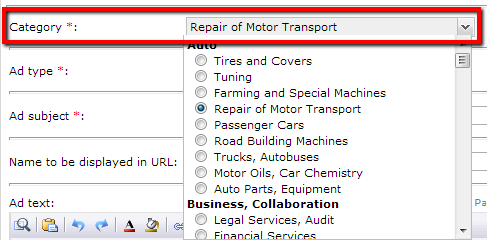 Save the changes. It is possible to set automatic transfer from the group "Users" into "Checked": Control Panel -> Users -> User groups: 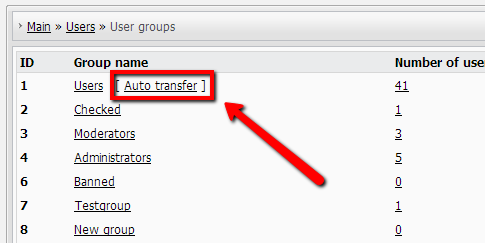 This feature is discussed in the following thread: http://forum.ucoz.com/forum/7-1900-1 Attachments:
3079138.png
(3.2 Kb)
·
6646225.png
(1.9 Kb)
·
2078221.png
(24.1 Kb)
·
6476660.png
(18.0 Kb)
I'm not active on the forum anymore. Please contact other forum staff.
|
Than You very much Sunny
 btw can i receive any notification on the site or my email address for any ad that has been paid for? |
@sunny, I dont know much about custom scripting, I'll go ask someone for help in the custom script forum.
Once again than you 
Post edited by Doomcaster - Wednesday, 2012-10-10, 6:55 PM
|
Doomcaster, try to request a script here: http://forum.ucoz.com/forum/25-15585-1
I'm not active on the forum anymore. Please contact other forum staff.
|
I have some more questions-
1."How do I share an ad on Facebook/Twitter/etc?" Suppose a user has posted an ad, i want to make a link so that when he clicks on it he can share it on his facebook page or twitter. 2.I want to include all the categories and sub-categories(created in the ad board) in the search feature(as filters), when a user is searching in the ad board. 3.While posting an ad, I want to create an extra field named "place" and make it compulsory for a user to fill it. ps-I created the field but I cant rename it Added (2012-10-16, 8:28 AM) |
2. Ye, that is exactly i want. User can select the category from the numerous i have created in ad board and search within them.
@sunny-Ty for replying on all my posts, atleast you are the only active person i see on the forums. Added (2012-10-17, 9:05 AM) Added (2012-10-17, 1:41 PM) Added (2012-10-18, 12:40 PM) Post edited by Doomcaster - Wednesday, 2012-10-17, 2:22 PM
|
2. It's better to do what you need with the help of filters: http://forum.ucoz.com/forum/10-3756-1
1. It won't be possible to do for each entry. You can paste the code to the page of all user's ads (the "Page with search results and entries rating" template for Ad Board), and a user will be able to share the link to all his ads. E.g. you can paste smth like this after $BODY$: Code <a href="http://www.facebook.com/share.php?u=$SECTION_NAME$" rel="nofollow" target="_blank" title="FaceBook"><img src="/.s/t/786/22.png"></a> <a href="http://twitter.com/share?url=$SECTION_NAME$" rel="nofollow" target="_blank" title="Twitter" style="margin: 0;"><img src="/.s/t/786/24.png"></a> Of you can paste the codes into the "Appearance of entries" template, and a user will be able to share when opening an ad page, e.g.: Code <a href="http://www.facebook.com/share.php?u=$TITLE$ //$ENTRY_URL$" rel="nofollow" target="_blank" title="FaceBook"><img src="/.s/t/786/22.png"></a> <a href="http://twitter.com/share?url=$TITLE$ //$ENTRY_URL$" rel="nofollow" target="_blank" title="Twitter" style="margin: 0;"><img src="/.s/t/786/24.png"></a> 3. You must paste the $CODE$ of your place field into the "Page with full entry text and associated comments" template. You can find the necessary $CODE$ on the list pf codes under the template. 4. A contact person is person whom an interested visitor (who wants to buy the things sold in the ad, for example) may contact to buy these things. And E stands for E-mail and is used to send an e-mail message to this contact person. I'm not active on the forum anymore. Please contact other forum staff.
|
How do i make this-
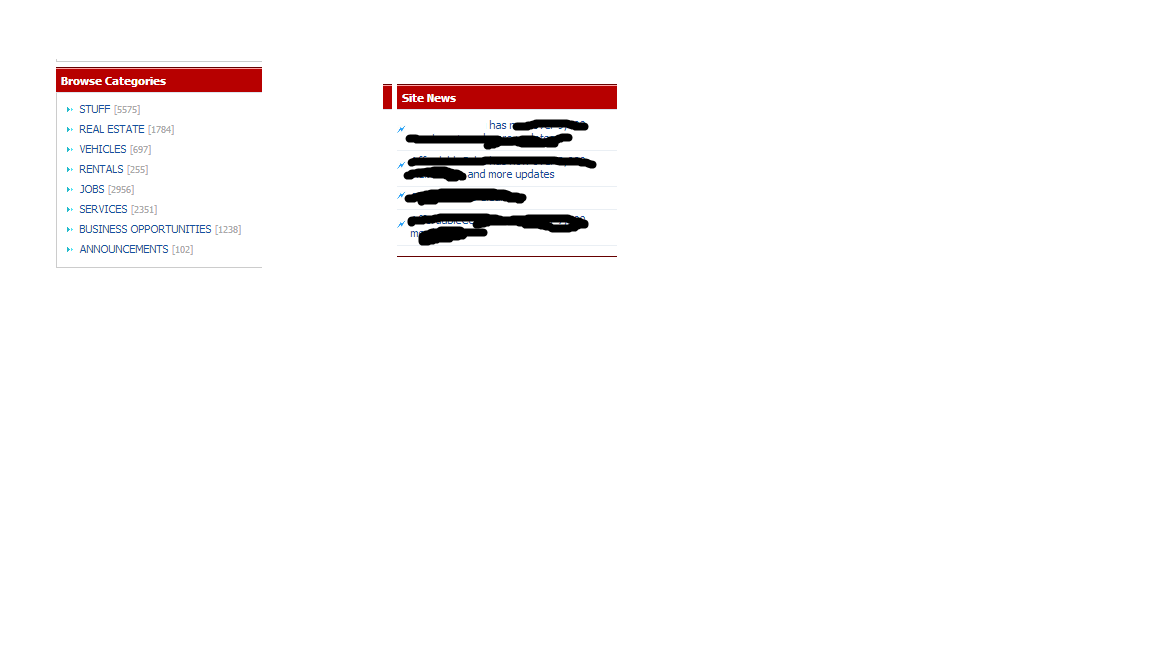 And show them both on the home page. Attachments:
8481355.png
(23.3 Kb)
Post edited by Doomcaster - Saturday, 2012-10-20, 8:05 PM
|
How do i make this-
(I have uploaded the image) Post edited by Doomcaster - Saturday, 2012-10-20, 8:02 PM
|






| |||
