


   |
| uCoz Community uCoz Modules Additional Features Site awards |
| Site awards |
After the last update a new feature has appeared - "Awards", it allows users to give awards to each other.
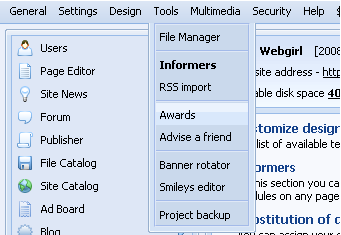
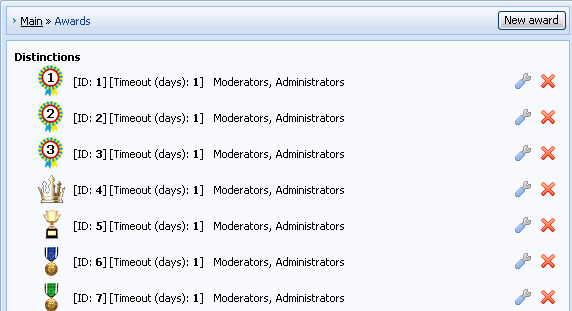
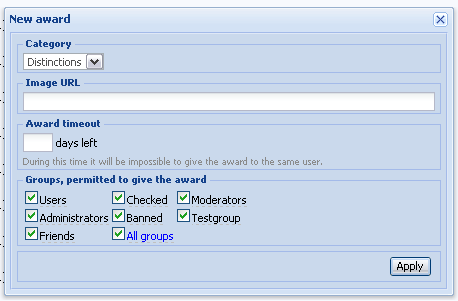
How to use this module: 1. You can find Awards in Control Panel -> Admin Bar -> Tools -> Awards 2. If this is the first time you go to Awards, you must install the module. If you don’t need Awards any more, you can disable the module in Users -> Module settings -> Enable "Awards" feature – just remove a check mark and save the changes. 3. After you have opened the Awards section, you will see the full list of awards, divided into categories. There are basic settings near each award: Timeout, ID and groups that are allowed to give this award. 4. To create a new award click on "New award" in the top right corner. Select a category, specify URL of the award, its timeout and select the groups to be able to give it. 5. Now, if you want awards to be displayed in user profiles (if they are there), go to Customize Design -> "User personal page" and paste the following code into the necessary place:
Code <?if($AWARDS_READ_URL$)?><div class="reputation">Awards: <a href="$AWARDS_READ_URL$" title="List of awards"><span class="repNums"><b>$AWARDS$</b></span></a> <?if($AWARDS_DO_URL$)?> <a href="$AWARDS_DO_URL$"><span style="font-size:8pt" title="Give award"><b>[ Give award ]</b></span></a><?endif?><?endif?> If you want awards to be displayed under avatar, paste the same code into "Appearance of entries" template for forum. 6. To give an award a user must open another user’s profile and click [ Give award ] . Then select an award and add a comment.
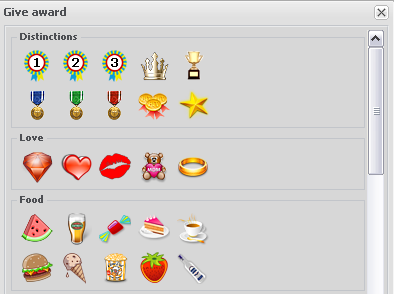
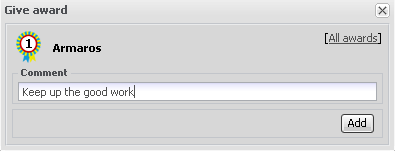
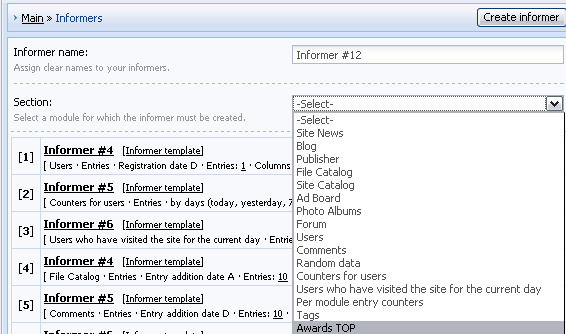
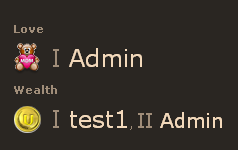
CREATION OF AWARD TOP If you want to create AWARD TOP, you need to do the following: 1. Go to "Informers" section (Control Panel -> Tools -> Informers). Click "Create informer", enter its name (any) and select AWARDS TOP section. Click "Create". 2. The informer has been created. Now paste the code (e.g. $MYINF_1$) into necessary templates. 3. Here is the result Question: there is the possibility to evaluate posts on this forum (Good/bad post). How can I do the same on my forum?
Code <?if($AWARDS_DO_URL$ && $USER_LOGGED_IN$ && $CUR_USER_ID$!=$UID$)?><div style="float:right"><a href="javascript://" onclick="openLayerB('AwD',0,'/index/55-$UID$-28-forum-$FID$_$TID$_$ID$_16_$TIMESTAMP$','Give award',380,200,1); return false;"><img src="http://s10.ucoz.net/img/icon/thumbu.png" width="13" border="0" title="Good post"></a> <a href="javascript://" onclick="openLayerB('AwD',0,'/index/55-$UID$-47-forum-$FID$_$TID$_$ID$_16_$TIMESTAMP$','Give award',380,200,1); return false;"><img src="http://s10.ucoz.net/img/icon/thumbd.png" width="13" border="0" title="Bad post"></a></div><?endif?> I'm not active on the forum anymore. Please contact other forum staff.
|
I see there is a widget awards, I activated it and now wondering how to give those awards to people? Is there a spot on here to explain this?
Thank you |
I'm just trying to understand how to give the awards to people on my site. I have seen it on other sites and when given they are found under the aviator. for example the medals. And right now the pic of
 is under everyone's aviator. is under everyone's aviator.
|
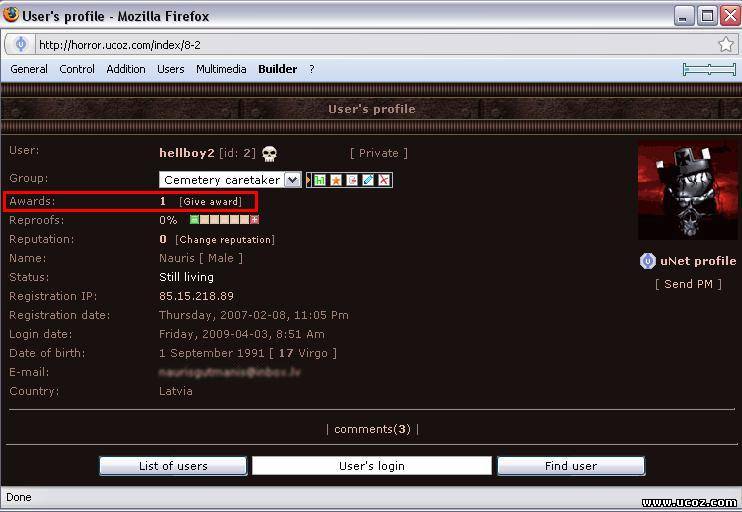 Here it must be. Attachments:
4790681.jpg
(58.6 Kb)
|
THANKS SUNNY
umm one more question how can i make the awards show under the rep or avatar when they post massage or thread thanks Added (2009-04-03, 3:12 Pm) |
slicer, easysharez, paste the following code into Forum "Appearance of entries" template
Code <?if($AWARDS_READ_URL$)?><div class="reputation">Awards: <a href="$AWARDS_READ_URL$" title="List pf awards"><span class="repNums"><b>$AWARDS$</b></span></a> <?if($AWARDS_DO_URL$)?> <a href="$AWARDS_DO_URL$"><span style="font-size:10pt" title="Give award"><b>+</b></span></a><?endif?><?endif?> I'm not active on the forum anymore. Please contact other forum staff.
|
I pasted the following in Appearance of entries
Code <?if($AWARDS_READ_URL$)?><div class="reputation">Awards: <a href="$AWARDS_READ_URL$" title="List pf awards"><span class="repNums"><b>$AWARDS$</b></span></a> <?if($AWARDS_DO_URL$)?> <a href="$AWARDS_DO_URL$"><span style="font-size:10pt" title="Give award"><b>+</b></span></a><?endif?><?endif?> I do not see no difference? And Thank you for your help. Post edited by easysharez - Saturday, 2009-04-04, 10:22 AM
|
Quote I pasted the following in Appearance of entries
Code <?if($AWARDS_READ_URL$)?><div class="reputation">Awards: <a href="$AWARDS_READ_URL$" title="List pf awards"><span class="repNums"><b>$AWARDS$</b></span></a> <?if($AWARDS_DO_URL$)?> <a href="$AWARDS_DO_URL$"><span style="font-size:10pt" title="Give award"><b>+</b></span></a><?endif?><?endif?> I do not see no difference? And Thank you for your help. This is how to put awards on "Appearance of entries" (that's means when you go to forum thread, you will see Awards under your Avatar, but no images...And that's possible without restoring your "Appearance of entries" template... But right now Im intrested, how to see this award picture under Avatar, is there some kind of code - something like  |
It's not possible to display award pictures under avatar with the help of standard means. If you have knowledge you can try to do this by means of jQuery.
As for that website you are talking about - I haven't seen it but I can guess that the awards were added before the update by means of scripts. So it's not a default uCoz feature. I'm not active on the forum anymore. Please contact other forum staff.
|
This also happend on mine. In the HTML for users profile page the Award codes are in there (e.g, $awards$ ...ect) - but when you view it on the site its not on. And i have enabled it for all users. How to make it viewable? Please help.
I have checked both Forum - Appearance Entries and Users - User Personal Page and yet both already had the codes. And it still doesn't show, even though awards have been enabled for all user groups. PLEASE HELP ..:: GAME REBOUND ::..
Please register on my website  Post edited by Danny - Tuesday, 2009-04-14, 11:41 PM
|













| |||
