Global Block - Design Customization - uCoz System management and tuning - uCoz Community
You logged in as Guest
Username/E-mail:
Recent messages · Members · Forum rules · FAQ · SEARCH Registration · Log in


We are in the second round! Let's keep voting!

Page 2 of 5«12345»
Forum moderator: Dartz 
uCoz Community » uCoz System management and tuning » Design Customization » Global Block (Instruction and Questions - Answers)
Global Block
SunnyDate: Friday, 2008-12-19, 8:04 Am | Message # 1
Haunter
Group: Administrators
Messages: 2016
Awards: 121
Reputation: 139
Status: Online
Global blocks are blocks available in all other templates of your website. By means of global blocks you can optimize the design of your website, having spitted it into common parts: e.g. HEADER – common top part, FOOTER – common bottom part etc. With the help of common blocks you can update the design on the whole website by means of editing only one block template.

Where to create a global block in the Control Panel:

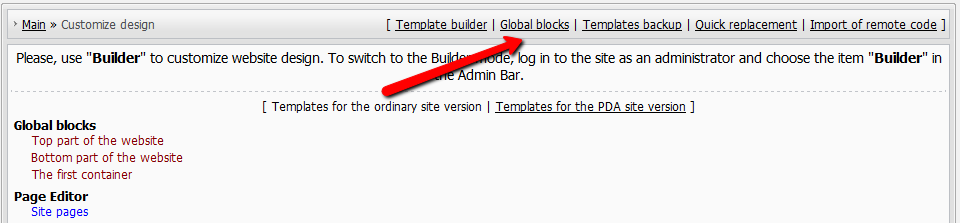
Mail » Customize Design » Global blocks

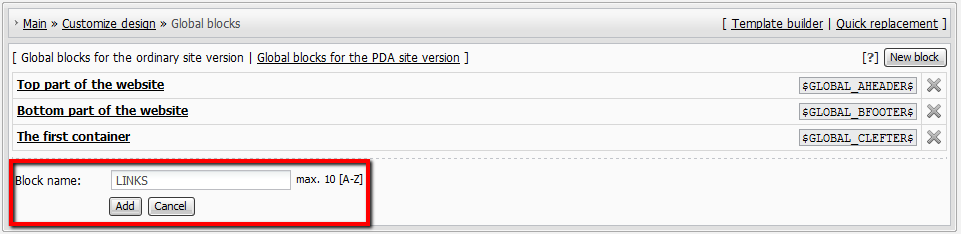
Block name must contain only upper case Latin letters, max length is 10 characters. This name will serve as the $code$ of the given global block in templates.

Max number of global blocks is 10, including $GLOBAL_FRIENDS$.

Note: If you are going to edit templates you must have basic knowledge of HTML and CSS.


There is one default global block - Site Friends.

Example of the block code:

Code
<ul class="uz">
<li class="menus"> <a target="_blank" href="http://www.ucoz.com/"><img src="http://money.ucoz.com/img/logo.gif" border="0" width="101" height="50" title="Create a site with uCoz" alt="Create a site with uCoz"></a></li></ul>
<div align="center">Forums</div>
<ul class="uz">
<li class="menus"><a href="http://www.forum.ucoz.com/" target="_blank" class="noun">English</a></li>
<li class="menus"><a href="http://www.forum.ucoz.de/" target="_blank" class="noun">German</a></li>
<li class="menus"><a href="http://www.forum.ucoz.es/" target="_blank" class="noun">Spanish</a></li>
</ul>

This is how it looks in templates:

Code
<table border="0" cellpadding="0" cellspacing="0" class="boxTable"><tr><td class="boxTitle"><b>Site friends</b></td></tr><tr><td class="boxContent">$GLOBAL_FRIENDS$</td></tr></table>


Question-Answer

How can I add global block in global block?

You can't... we don't support global blocks nesting.

New global block! How can I add one?

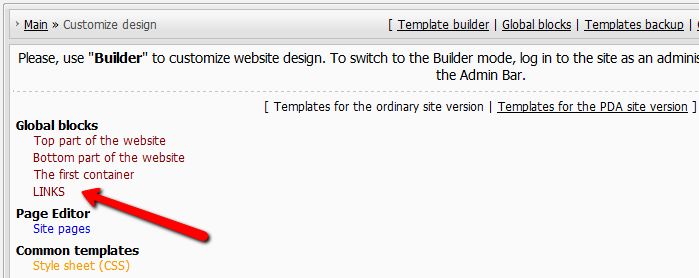
1. add global block
2. fill it with content.
3. add the code $GLOBAL_ANYWORD$ to the templates you want that block to be shown in.
Don't forget about the feature "Quick substitution of template parts" and try to examine the feature "Templates builder" in Design tab of the Control Panel.

I’ve noticed the global block $GLOBAL_SOANDSO$ will not run inside $CONTENT$ area.
Correct me if am wrong!

You are right. Global blocks work in templates only

Just 10 global blocks?

10 is the limit, you can't create more global blocks.


I'm not "man", "sir" or whatever. I'm female!
About signatures, screenshots etc...
 
brightwayDate: Sunday, 2009-03-22, 12:38 Pm | Message # 16
Newbie
Group: Users
Messages: 1
Awards: 0
Reputation: 0
Status: Offline
hi
could anyone help me please with pictures because i keep do the thing you say and it won't come up
please
 
ArmarosDate: Sunday, 2009-03-22, 12:49 Pm | Message # 17
Haunter
Group: Checked
Status: Offline
brightway, you tell us step by step what you are doing.
MichDate: Sunday, 2009-04-05, 6:09 Am | Message # 18
Regular
Group: Checked
Messages: 98
Awards: 0
Reputation: -1
Status: Offline
Aint this guid kinda old now?

What signature rule, i haven't heard a thing about any signature rules, and now im banned. -.-
 
ArmarosDate: Sunday, 2009-04-05, 6:10 Am | Message # 19
Haunter
Group: Checked
Status: Offline
Quote (Mich)
Aint this guid kinda old now?
Everything will be updated after bugs will be fixed.
MichDate: Sunday, 2009-04-05, 6:14 Am | Message # 20
Regular
Group: Checked
Messages: 98
Awards: 0
Reputation: -1
Status: Offline
Quote (Armaros)
Everything will be updated after bugs will be fixed.

Got it.


What signature rule, i haven't heard a thing about any signature rules, and now im banned. -.-
 
MazerisDate: Monday, 2009-04-06, 7:04 Am | Message # 21
Newbie
Group: Users
Messages: 2
Awards: 0
Reputation: 0
Status: Offline
hi i want to change text color in $SMENU_1$ how to do this ?

Quote
<TABLE class=boxTable cellSpacing=0 cellPadding=0 border=0>
<TBODY>
<TR>
<TD class=boxTitle><B><!-- <bt> --><SPAN style="COLOR: #000000">Navigacija<!-- </bt> --></SPAN></B></TD></TR>
<TR>
<TD class=boxContent><!-- <bc> -->$SMENU_1$<!-- </bc> --></TD></TR></TBODY></TABLE><?endif?><!-- </block1> --><!-- <block2> --><?if($LOGIN_FORM$)?>


Message edited by Mazeris - Monday, 2009-04-06, 7:05 Am
 
ArmarosDate: Monday, 2009-04-06, 7:59 Am | Message # 22
Haunter
Group: Checked
Status: Offline
Mazeris,

First, this got nothing to do with Global Blocks. Second, edit CSS.
Third, if you don't have enough of knowledge - don't touch CSS.

MazerisDate: Monday, 2009-04-06, 8:06 Am | Message # 23
Newbie
Group: Users
Messages: 2
Awards: 0
Reputation: 0
Status: Offline
maybe you can help where is in CSS $SMENU_1$ text color ? becouse i cant find i only find its Font size..

at these line i can change its size but not color...

Quote
td, body {font-family:verdana,arial,helvetica; font-size:8pt; color:#000000}
form {padding:0px;margin:0px;}
 
ArmarosDate: Monday, 2009-04-06, 8:10 Am | Message # 24
Haunter
Group: Checked
Status: Offline
Mazeris, you have problem reading? This is about Global Block.
CSS counts as custom, if you lack of knowledge - your problem.
webboxDate: Monday, 2009-04-06, 10:13 Pm | Message # 25
Newbie
Group: Users
Messages: 5
Awards: 0
Reputation: 0
Status: Offline
Quote (brightway)
hi could anyone help me please with pictures because i keep do the thing you say and it won't come up please

By brightway.

To post an imiage on your website using url use this code:
<img src="http://picture url" alt="" border="0">

example:
<img src="http://www.cinemablend.com/images/reviews/407/main.jpg" alt="" border="0">

To put a ticture that you uploaded to your File Maneger use this code:
<img src="picture name" alt="" border="0">

example:
<img src="rockets.jpg" alt="" border="0">

Message edited by webbox - Monday, 2009-04-06, 10:15 Pm
 
ArmarosDate: Tuesday, 2009-04-07, 5:57 Am | Message # 26
Haunter
Group: Checked
Status: Offline
You don't need alt="" in code.
adminwiinewsDate: Tuesday, 2009-04-07, 7:04 Pm | Message # 27
Curious
Group: Checked
Messages: 22
Awards: 0
Reputation: 0
Status: Offline
Hey! How i create a new global block?? WIth the ultimate update, i didn't see the option to create a new global block

Under construction the best comunity of videogames!!

Enter soon on www.njusted.com

 
ArmarosDate: Tuesday, 2009-04-07, 7:18 Pm | Message # 28
Haunter
Group: Checked
Status: Offline
Quote (adminwiinews)
Hey! How i create a new global block?? WIth the ultimate update, i didn't see the option to create a new global block
It's in same place: CP -> Customize Design -> Global Blocks -> New block.

Make sure you didn't reach the limit. Limit is 10 Global Blocks.

adminwiinewsDate: Wednesday, 2009-04-08, 6:14 Pm | Message # 29
Curious
Group: Checked
Messages: 22
Awards: 0
Reputation: 0
Status: Offline
Thank you very much Armaros!

Under construction the best comunity of videogames!!

Enter soon on www.njusted.com

 
noredtapeDate: Wednesday, 2009-04-08, 6:15 Pm | Message # 30
Newbie
Group: Users
Messages: 3
Awards: 0
Reputation: 0
Status: Offline
please help me how to add some ads on my global blocks..huhuhu..
 
uCoz Community » uCoz System management and tuning » Design Customization » Global Block (Instruction and Questions - Answers)
Page 2 of 5«12345»
Search: