| Global Block |
| Sunny | Date: Friday, 2008-12-19, 8:04 Am | Message # 1 |
Haunter
Group: Administrators
Messages: 2016
Awards: 121
Reputation: 139
Status: Online
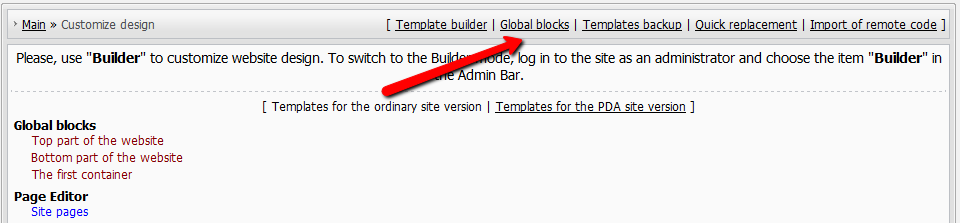
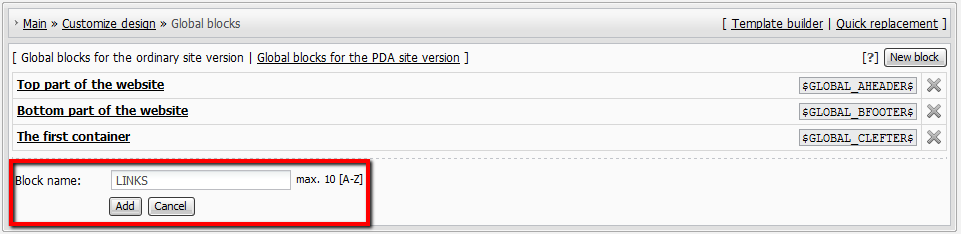
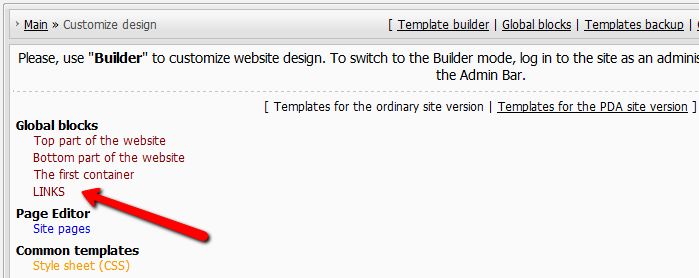
| Global blocks are blocks available in all other templates of your website. By means of global blocks you can optimize the design of your website, having spitted it into common parts: e.g. HEADER – common top part, FOOTER – common bottom part etc. With the help of common blocks you can update the design on the whole website by means of editing only one block template. Where to create a global block in the Control Panel: Mail » Customize Design » Global blocks Block name must contain only upper case Latin letters, max length is 10 characters. This name will serve as the $code$ of the given global block in templates. Max number of global blocks is 10, including $GLOBAL_FRIENDS$. Note: If you are going to edit templates you must have basic knowledge of HTML and CSS. There is one default global block - Site Friends. Example of the block code: Code <ul class="uz"> <li class="menus"> <a target="_blank" href="http://www.ucoz.com/"><img src="http://money.ucoz.com/img/logo.gif" border="0" width="101" height="50" title="Create a site with uCoz" alt="Create a site with uCoz"></a></li></ul> <div align="center">Forums</div> <ul class="uz"> <li class="menus"><a href="http://www.forum.ucoz.com/" target="_blank" class="noun">English</a></li> <li class="menus"><a href="http://www.forum.ucoz.de/" target="_blank" class="noun">German</a></li> <li class="menus"><a href="http://www.forum.ucoz.es/" target="_blank" class="noun">Spanish</a></li> </ul> This is how it looks in templates: Code <table border="0" cellpadding="0" cellspacing="0" class="boxTable"><tr><td class="boxTitle"><b>Site friends</b></td></tr><tr><td class="boxContent">$GLOBAL_FRIENDS$</td></tr></table> Question-Answer How can I add global block in global block? You can't... we don't support global blocks nesting. New global block! How can I add one? 1. add global block 2. fill it with content. 3. add the code $GLOBAL_ANYWORD$ to the templates you want that block to be shown in. Don't forget about the feature "Quick substitution of template parts" and try to examine the feature "Templates builder" in Design tab of the Control Panel. I’ve noticed the global block $GLOBAL_SOANDSO$ will not run inside $CONTENT$ area. Correct me if am wrong! You are right. Global blocks work in templates only Just 10 global blocks? 10 is the limit, you can't create more global blocks.
I'm not "man", "sir" or whatever. I'm female! About signatures, screenshots etc...
|
|
| |
|
| Sunny | Date: Monday, 2009-07-27, 3:01 Am | Message # 46 |
Haunter
Group: Administrators
Messages: 2016
Awards: 121
Reputation: 139
Status: Online
| donmarius, where are you trying to put the global block code? Most probably your logo is in "Top part of the website" which is a global block also. And you can't put one block inside another block, therefore use the full code.
I'm not "man", "sir" or whatever. I'm female! About signatures, screenshots etc...
|
|
| |
|
| Condorn1 | Date: Friday, 2009-08-07, 6:12 Am | Message # 47 |
Newbie
Group: Users
Messages: 18
Awards: 0
Reputation: 0
Status: Offline
| Hi , I created a global block and placed simple text in its body. And placed it in a page. But the text is not coming on the page. Anything missed?Added (2009-08-07, 6:12 Am) --------------------------------------------- can i place anything in the global block like java scripts?
|
|
| |
|
| Armaros | Date: Friday, 2009-08-07, 6:12 Am | Message # 48 |
Haunter
Group: Checked
Status: Offline
| Condorn1, added blocks code in the page? Re-do.
|
|
| |
|
| Condorn1 | Date: Friday, 2009-08-07, 6:16 Am | Message # 49 |
Newbie
Group: Users
Messages: 18
Awards: 0
Reputation: 0
Status: Offline
| I have pasted this code in top of the page $GLOBAL_Welcome$ its body contains Can i place any thing like java scripts in the global block body?
|
|
| |
|
| Armaros | Date: Friday, 2009-08-07, 6:18 Am | Message # 50 |
Haunter
Group: Checked
Status: Offline
| Quote (Condorn1) Can i place any thing like java scripts in the global block body? Yes.
|
|
| |
|
| Condorn1 | Date: Friday, 2009-08-07, 6:22 Am | Message # 51 |
Newbie
Group: Users
Messages: 18
Awards: 0
Reputation: 0
Status: Offline
| Quote Condorn1, added blocks code in the page? Re-do. I have added blocks in the page but the text is not coming. (I have pasted the code in a page through the page editor html panels code.)
Message edited by Condorn1 - Friday, 2009-08-07, 6:26 Am |
|
| |
|
| Sunny | Date: Friday, 2009-08-07, 8:36 Am | Message # 52 |
Haunter
Group: Administrators
Messages: 2016
Awards: 121
Reputation: 139
Status: Online
| Condorn1, if you pasted the code in the top part of the website (or any other default global block - the first container, the second container...) then it won't work - a global block can't be used within another global block.
I'm not "man", "sir" or whatever. I'm female! About signatures, screenshots etc...
|
|
| |
|
| Condorn1 | Date: Friday, 2009-08-07, 8:45 Am | Message # 53 |
Newbie
Group: Users
Messages: 18
Awards: 0
Reputation: 0
Status: Offline
| Quote (Sunny) Condorn1, if you pasted the code in the top part of the website (or any other default global block - the first container, the second container...) then it won't work - a global block can't be used within another global block. It means that i can't use global block in page editor. I have to go to module design customization->site pages??
|
|
| |
|
| Sunny | Date: Tuesday, 2009-08-11, 2:07 Am | Message # 54 |
Haunter
Group: Administrators
Messages: 2016
Awards: 121
Reputation: 139
Status: Online
| Condorn1, yes. But why do you need a separate global block? You can simply put your code directly into Top part of the website (or another global block).
I'm not "man", "sir" or whatever. I'm female! About signatures, screenshots etc...
|
|
| |
|
| kostova | Date: Thursday, 2009-10-22, 10:02 Pm | Message # 55 |
Regular
Group: Checked
Messages: 58
Awards: 2
Reputation: 4
Status: Offline
| I'm not sure why this has happened, but I recently started using the global clefter and input some of my own informers, and when I viewed the page design customization on the site news module through the site, it reverted the global clefter back to it's original codes with the <!-block#-> comments on it. I don't use the Builder for anything, but is there any particular reason it's doing this? I did notice, when testing the builder on another site, that the builder has the block#'s, and if you try to place a code between blocks, save, and use the builder afterwards, it will delete the codes you've just placed. But in my case, the codes disappear and it comes up with blocks, as if I was using the builder. It's disabled too. In any case, with the builder disabled, is it good to use the preexisting global blocks for your own designs?
|
|
| |
|
| Sunny | Date: Friday, 2009-10-23, 5:03 Am | Message # 56 |
Haunter
Group: Administrators
Messages: 2016
Awards: 121
Reputation: 139
Status: Online
| kostova, I can't say where is the problem. I tried to do smth similar and had no problems. I you have a test website try to edit it in the same way and see what happens.
I'm not "man", "sir" or whatever. I'm female! About signatures, screenshots etc...
|
|
| |
|
| animeandstuff | Date: Friday, 2009-10-30, 4:29 Pm | Message # 57 |
Regular
Group: Checked
Messages: 72
Awards: 0
Reputation: 0
Status: Offline
| How do i change the background images behind say like Menu and Search ??? i know its in customize design
|

|
| |
|
| Dartz | Date: Friday, 2009-10-30, 11:29 Pm | Message # 58 |
Cookie Monster
Group: Head Mod
Messages: 5961
Awards: 61
Status: Offline
| animeandstuff, ask in specific thread, please.
*Yawn... drools on Renatus while sleeping...*
|
|
| |
|
| NTP | Date: Tuesday, 2009-11-03, 10:39 Pm | Message # 59 |
|
Curious
Group: Checked
Messages: 24
Awards: 0
Reputation: 0
Status: Offline
| it still doesnt work
|
|
| |
|
| Sunny | Date: Wednesday, 2009-11-04, 2:55 Am | Message # 60 |
Haunter
Group: Administrators
Messages: 2016
Awards: 121
Reputation: 139
Status: Online
| NTP, what is this "it" that doesn't work?
I'm not "man", "sir" or whatever. I'm female! About signatures, screenshots etc...
|
|
| |