


   |
| uCoz Community uCoz Modules Site Users User Ranks and Titles |
| User Ranks and Titles |
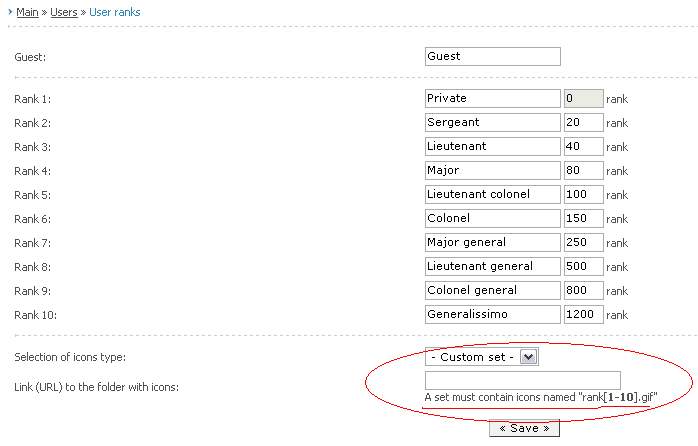
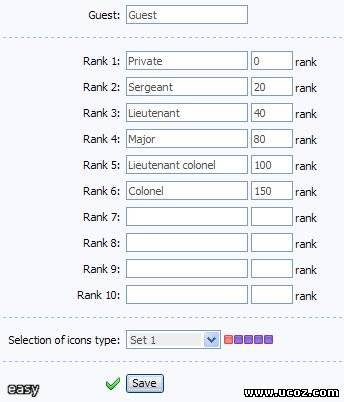
You can edit ranks here – Control Panel » Main » Users » User ranks.
There are 10 ranks + Guest. You can write your own name for each rank including Guest. An empty field will be filled in with a default rank when saving. You can assign an image to each rank either from a default set or from your custom one. A custom set must contain icons with the names "rank[1-10].gif". They are placed in the special field which appears only after you have chosen "Custom set". You must specify full address to the folder with rank images - http://your_site.ucoz.com/your_folder/. Images should be uploaded to the site beforehand via FTP or File Manager, not as an archive but as separate files.
Ranks are assigned according to the number of forum posts.
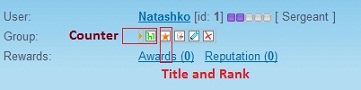
 Personal rank, named "User’s title" appears in the forum and in a Profile by default instead of a rank, and group image (in the forum) instead of a rank image. To insert an image instead of text in a Title you should write the following in the field: Personal rank, named "User’s title" appears in the forum and in a Profile by default instead of a rank, and group image (in the forum) instead of a rank image. To insert an image instead of text in a Title you should write the following in the field:
Code <img src="full_address_of_custom_image"> It is advisable to have a short address because there is a limit on the number of characters in the field. If you want to output both group image and rank image then edit the template of entry appearance (you should first enable it in Forum Settings). You can change ranks in the Control Panel by changing number of messages, therefore ranks are assigned according to the number of messages in the forum. If you want both a rank and a title being displayed then go to Control Panel - Forum – Module design customization – Appearance of entries:
Code <?if($USER_TITLE$)?><div class="postRankName">$USER_TITLE$</div><?else?><div class="postRankName">$USER_RANK_NAME$</div><?endif?> The code shows that either rank or title is displayed, so you should divide this line into two:
Code <?if($USER_TITLE$)?><div class="postRankName">$USER_TITLE$</div><?endif?> <?if($USER_RANK_NAME$)?><div class="postRankName">$USER_RANK_NAME$</div><?endif?> You can assign your own classes.
Question - Answer
Quote Maybe should allow to make more user ranks? 10 ranks is enough, you can't add more....
Quote how do i add custom user rank icons? i put the name of the images rank1 rank2 rank3 rank4 rank5 etc. all the way up to 10. there in gif formate. i put them in a file on my website. i put the url of the file into the custom icon thing in the user ranks. But when i look at the pictures of them on my site. nothing is there What url you put in "Link (URL) to folder with icons"?
Quote Aint it possible to remove ranks, or make it less, cause i don't want, or need 10 ranks
It is possible to change User Title and Rank value in the personal profile:
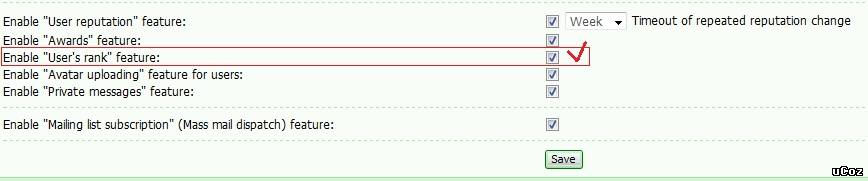
Do not forget that "User's rank" feature should be enabled in Control panel->Users->Module settings
Attachments:
4242900.png
(16.9 Kb)
·
8490155.jpg
(21.8 Kb)
·
9511682.jpg
(11.4 Kb)
·
9533284.jpg
(85.0 Kb)
I'm not active on the forum anymore. Please contact other forum staff.
|
adray, do you mean that ranks for some users where changed manually? I am not sure it will work but try to disable "Enable "User's rank" feature:" in Control Panel -> Users -> Module settings and then enable the option again.
I'm not active on the forum anymore. Please contact other forum staff.
|
Avarice, "rank1.gif" would be the proper name.
Proud uCoz user since 2006
Freelance designer - http://pixelkhaos.com PixelKhaos on twitter - @PixelKhaos I can help you develop your site for a small fee. |
Stroud458, No. Although this has been requested to be changed quite a lot, but I do not think it will be changed in a near future.
Proud uCoz user since 2006
Freelance designer - http://pixelkhaos.com PixelKhaos on twitter - @PixelKhaos I can help you develop your site for a small fee. |
Is there a way to locate these scripts .Im new at this I dont know much about scripts
|
carloscompu, here is one.
Add the following to the page where you want ranks to be displayed: Code <script type="text/javascript"> $(document).ready(function() { $('span.getrangetc').load('/index/8 #getrangetc'); }); </script><span class="getrangetc"></span> And then add the following to "User's personal page" (any part): Code <div style="display:none;"><span id="getrangetc">$_RANK_ICON$$_RANK_NAME$</span></div> I'm not active on the forum anymore. Please contact other forum staff.
|
Thank Sunny this works perfectly,
One more Question : Can I use this code for every information that the user has in the personal user page like the amount of coments and other information that i want to display on the side bar. so That you can have an Idea of my website ,Im opening a latin social iteractive network,each user has their own personal wall and everything like a social network,but an opened style not a private one like facebook And i apreciate your help |
Sunny ,how can i view other user profile information on the side bar with this same code that you gave me or is their any other adjustments to the code to view other users info
ok here is an example: in the bottom of the user's entry you can see the words added by:$username$ ok with this i Want to add ... # of entries Users avatar users rank and icon users points The same information that I can view in my own side bar(you will see it when you log in my website cyberq.org) Is the same information I want to show When I view other Users Entries |
carloscompu, the code Sunny provided to you before will work for any fields you wish to display anywhere on your site.

Jack of all trades in development, design, strategy.
Working as a Support Engineer. Been here for 13 years and counting. |










| |||
