


   |
| uCoz Community » uCoz Modules » Additional Features » FTP connection (uploading of files via FTP) |
| FTP connection |
FTP (File Transfer Protocol) is a standard network protocol used to transfer files from one host to another host over a TCP-based network, such as the Internet (Wikipedia). To use FTP you will need a special program - an FTP client, e.g. Filezilla, CuteFTP, FTP Commander etc. A browser cannot be used for this purpose. You can get additional info on these and other programs with the help of search engines (Google, Yahoo! etc.). Learn how to setup FTP on uCoz and connect using a FTP client (guide by TeamNiBiC) 1. Sign in to your Control Panel (http://example.ucoz.com/admin) 2. At the main page, click on FTP details. 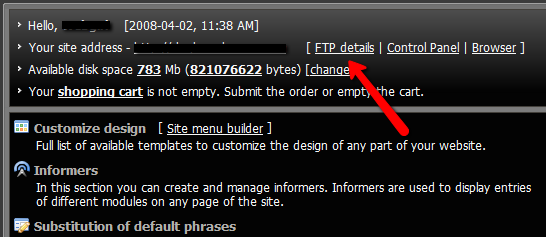 3. A window will appear, where you will find: host, login and password. If you haven't set the password yet, click the link and set one. 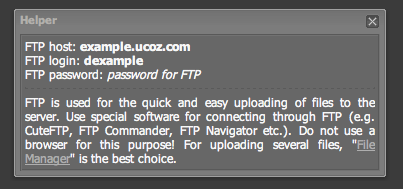 4. Save the information or at least keep the window open for you to log in using your favorite client. I recommend Filezilla, which can be found by Google: Filezilla download. 5. Install and launch the client and sign in with your information. For FTP programs to work properly you should check your network settings, the settings of firewall and antivirus software. It is desirable to look into the error log. If the connection to the server was established, an error will be clearly described. If there is no connection then there is something wrong with the network or client settings. You may often need to use the passive mode, if your ISP sets limitations. ATTENTION! To establish an FTP connection you should observe the following conditions: 1. Your e-mail must be confirmed. 2. Your website must be at least 2 hours old (sometimes up to 24 hours) for FTP to work. 3. The installed security programs must not forbid FTP connection. 4. The passive mode must be selected. 5. Enter the data into your FTP client manually, and not by means of copy&paste. Static .htm and .html files should be uploaded via File Manager. Static files are not very welcome at uCoz. If you need them more then 10 you have chosen a wrong hosting. COMMON RULES FOR FTP AND FILE MANAGER - The max size of a file to upload is 15 Mb. - The max length of a file name with extension is 45 characters. - One nesting level can have not more than 200 files and folders (max nesting depth is 4). - A file name can contain only Latin letters, digits, an underscore and a hyphen. See how to work with FTP here Attachments:
0267777.png
(27.5 Kb)
·
6921784.png
(23.8 Kb)
I'm not active on the forum anymore. Please contact other forum staff.
|
FireFTP works just fine in all of my other accounts. I see no reason for it to not work here.
I used to use Filezilla. But about 2 years ago they added a lot of stuff to the options menu that I didn't understand. So I deleted it. I wasn't willing to spend a week relearning it. Why make things harder than they have to be? |
how can i upload .php files, b/c when i try to go through both the file manager and through my FTP clients (yes i have more than one), none of them work,
any help would be appreciated EDIT: specifically i'm trying to use simple machines forums on here
Answer: PHP is not allowed at uCoz. [Sunny] Post edited by wormat22 - Tuesday, 2008-12-23, 3:03 PM
|
I hv 2 Qs actually:
1. Can i move files to one of my other ucoz site? If i can, what is the easiest way? 2. I'm not being able to upload files thru FTP uploader like "CuteFTP". A mssg: "The filename provided is not being accepted by the server. Please check for invalid characters and try again." is coming. The file name i'm tring to upload is like "Good Guy.rar". File vol. is widin 15 mb.. What's the wrong!? Welcome all:
 Post edited by rDX - Tuesday, 2009-01-06, 12:37 PM
|
Quote (rDX) 1. Can i move files to one of my other ucoz site? If i can, what is the easiest way? Re-upload them to the sites FTP, I guess.
Quote (rDX) 2. I'm not being able to upload files thru FTP uploader like "CuteFTP". A mssg: "The filename provided is not being accepted by the server. Please check for invalid characters and try again." is coming. The file name i'm tring to upload is like "Good Guy.rar". File vol. is widin 15 mb.. What's the wrong!?
This topic might help - http://forum.ucoz.com/forum/6-2500-1 |
Quote (rDX) I'm not being able to upload files thru FTP uploader like "CuteFTP". A mssg: "The filename provided is not being accepted by the server. Please check for invalid characters and try again." is coming. The file name i'm tring to upload is like "Good Guy.rar". File vol. is widin 15 mb.. What's the wrong!? It's the space in file name. I'm not active on the forum anymore. Please contact other forum staff.
|
why can't I upload .asp & .php files?
Answer: http://faq.ucoz.com/#2 http://faq.ucoz.com/#26 [Sunny] http://www.alcohol-boys.ucoz.com
|
Can't connect to my ftp, I don't know what's my ftp password
 Where can I find it? When I click "FTP details" in my control panel, after the ftp password I see only this: FTP password: password for FTP Where can I find it? When I click "FTP details" in my control panel, after the ftp password I see only this: FTP password: password for FTP Please help
Answer: FTP password was provided to you at registration. It can be changed at Control Panel -> Security -> Change FTP password. [Sunny] http://myweb.ucoz.com
Post edited by levani - Monday, 2008-03-31, 12:40 PM
|
i want to login on my FTP and upload stuffs by FTP ... which program i need ? casue i tried to login in with IE but it don't works .. can u help me ?
Answer: You need ftp client. If u use some file manager (Total Comander, FAR) u may use it. Or FTP-clinet lCuteFTP, FileZilla etc. --> Nokia - Confusing People <--
|
Hey, I know alot about ftp and i know how to use it but the info i got for it will not work. I even saved it in a text.
Login (username) to the Control Panel: eccentricgaming.ucoz.org of course i replaced all my passwords with the stars... but yeah help please. |
fozz, you think uCoz is a standard hosting - this is not so.
1. uCoz is the CMS for creating dynamic projects (not for static .html files). Your mind is not transformed for using new generation of web creating technology yet, so choose any of old style hostings and upload your files there. |
i am asking can i use Putty i am trying to login put he keep telling me acess dined any tips? i am useing the putty btw to telnet to the ftp and creat eggdrops.
usename@server.ucoz.net's password: Access denied ysername@server.ucoz.net's password: btw are u support SSH ? Post edited by ColdFire - Saturday, 2008-07-26, 2:53 PM
|











| |||