Site Menu Builder - Page Editor - uCoz System management and tuning - uCoz Community
You logged in as Guest
Username/E-mail:
Recent messages · Members · Forum rules · FAQ · SEARCH Registration · Log in


We are in the second round! Let's keep voting!

Page 2 of 7«123467»
Forum moderator: Dartz 
uCoz Community » uCoz System management and tuning » Page Editor » Site Menu Builder (how to create/edit a site menu)
Site Menu Builder
SunnyDate: Saturday, 2009-04-04, 8:50 Am | Message # 1
Haunter
Group: Administrators
Messages: 2016
Awards: 121
Reputation: 139
Status: Online
If you have lost your site menu after the global upgrade, or if you simply want to add one more menu or edit the existing, follow this guide.

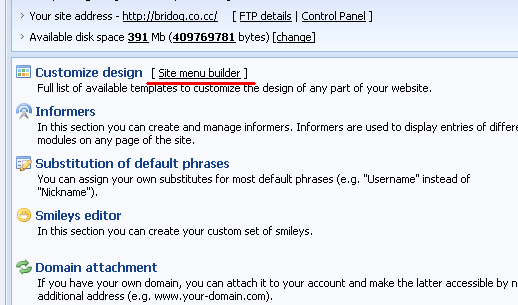
Go to Control Panel > [Site menu builder]
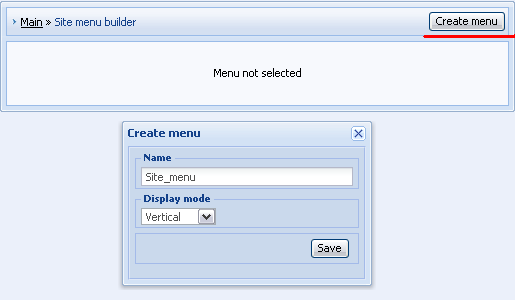
After you click on "Create menu" a new pop-up window will appear. Enter a name of your menu (e.g. "Site_menu"), select display mode (usually it is vertical) and click save.
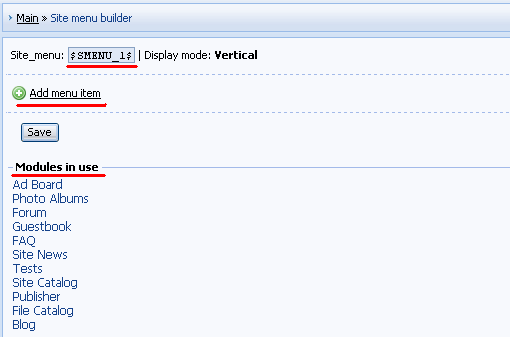
In "Site menu builder" you should pay attention to the following:

а) $SMENU_1$ - a code used in default templates to display site menu. A new created menu must have this $code$.
б) "+ Add menu item" – this link will call a pop-up window by means of which you can add menu items.
в) Under "Modules in use" you can see a list of all active modules. Click on a link to see url of a module.
Let's add "Ad Board" to our menu as an example.
First click on "Ad Board" in "Modules in use" and copy the url to the clipboard.
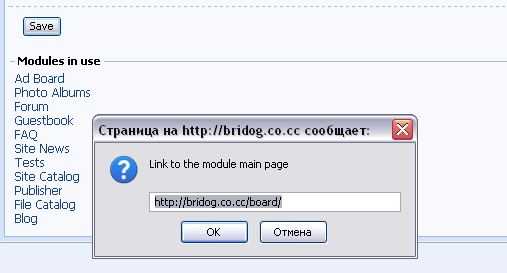
Then click on "+ Add menu item" and enter a name of the item and paste its url in a window that will appear. Click "Apply".
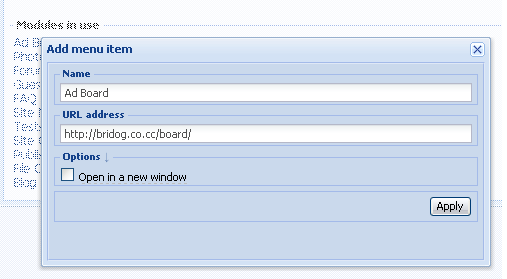
In the same way you can add other menu items.
To change the order of items drag them by means of a mouse.
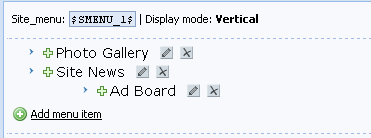
If you want to add a subitem, click on a cross near the necessary item and drag it on the item, under which you want it to appear:

After you have made all necessary changes don't forget to click "Save".
If your new menu doesn’t appear automatically you may need to resave the corresponding template (e.g. Top part of the website).

Video: http://ucool.ucoz.com/dir/3-1-0-2


I'm not "man", "sir" or whatever. I'm female!
About signatures, screenshots etc...
 
PIPERONDate: Tuesday, 2009-04-07, 10:00 Pm | Message # 16
Newbie
Group: Users
Messages: 4
Awards: 0
Reputation: 0
Status: Offline
Hi Sunny,

I was trying to register another account for my friend under the email simsharon@rocketmail.com
And I deleted the account after the menu is gone (selected another design).
I thought I can register a new site with the same email account but the system keep rejecting me.
Please help. Thanks a milllion!


With million of love from Singapore.
Piperon - One and Only spiritual flute player on Earth.

Official Website : www.piperon.net.ms
Myspace Website : www.myspace.com/piperon
Mixposure Website : www.mixposure.com/piperon

 
tcb4epDate: Wednesday, 2009-04-08, 0:17 Am | Message # 17
Newbie
Group: Users
Messages: 4
Awards: 1
Reputation: 1
Status: Offline
i hate to sound like i am just dumber then dirt,, but i am still having issues coding my menu,, i use dreamweaver and notepad. below is my site link and two urls from the pages.. everytime i make the link the page looks like the main page,
i would deeply appreciate some help
, if someone could create the sample for me to follow using my links, that would be wonderful.,

http://spansurf.ucoz.com

http://spansurf.ucoz.com/index/0-14

http://spansurf.ucoz.com/index/0-24

 
SunnyDate: Wednesday, 2009-04-08, 3:32 Am | Message # 18
Haunter
Group: Administrators
Messages: 2016
Awards: 121
Reputation: 139
Status: Online
PIPERON, if you have already used this e-mail for a website it must have been added to the uNet database. You may try to log in to uNet (Webtop) and create a website from there. But since you want to create a website for your friend it's better to use a new e-mail (his e-mail).

tcb4ep, how did you create you pages and how did you add you content? As fas as I can see you are trying to create a website by means of uploaded static pages. In this case I can't help you since you are not using uCoz content modules and features. All depends on your knowledge.


I'm not "man", "sir" or whatever. I'm female!
About signatures, screenshots etc...
 
classic007Date: Wednesday, 2009-04-08, 5:59 Am | Message # 19
Curious
Group: Checked
Messages: 20
Awards: 0
Reputation: 0
Status: Offline
thanks for the info... Site menu on my site is lost after the global update... sad

check my page at Geeks
My webpage
 
ArmarosDate: Wednesday, 2009-04-08, 6:07 Am | Message # 20
Haunter
Group: Checked
Status: Offline
Quote (classic007)
Site menu on my site is lost after the global update...
It should be: CP -> Customize Design -> Global Blocks -> AAMENU.
SEEPDate: Thursday, 2009-04-09, 6:44 Am | Message # 21
Newbie
Group: Checked
Messages: 16
Awards: 0
Reputation: 0
Status: Offline
Before ucoz updated i could click on a eye and change the buttons, but now it doesn't is a eye i can click on and change the buttons!


So please help me!

my site is: http://www.zedso.ucoz.com


http://www.zedso.ucoz.com


Message edited by SEEP - Thursday, 2009-04-09, 6:44 Am
 
ArmarosDate: Thursday, 2009-04-09, 7:34 Am | Message # 22
Haunter
Group: Checked
Status: Offline
SEEP, you can create your custom menu via Global Block & edit everything via 'Builder'.
tcb4epDate: Thursday, 2009-04-09, 6:33 Pm | Message # 23
Newbie
Group: Users
Messages: 4
Awards: 1
Reputation: 1
Status: Offline
links to my individual custom pages all take me to the main page.. i can tell no difference in content as all my content pages have different text info in the body
 
tapirlautDate: Friday, 2009-04-10, 7:05 Am | Message # 24
Curious
Group: Checked
Messages: 22
Awards: 0
Reputation: 1
Status: Offline
How to put flash buttons? I already have the code but I don't know where can I put the code into site menu...

is there any way?


I'm a total blank about all this stuff...I hope you all guide me how to solve the problems related to my questions...

THANKS ^___^

 
ArmarosDate: Friday, 2009-04-10, 7:12 Am | Message # 25
Haunter
Group: Checked
Status: Offline
tcb4ep, what this got to do with Site Menu?

tapirlaut, create a Global Block, put code there. Use builder to add new block and insert global block.

tapirlautDate: Saturday, 2009-04-11, 8:07 Am | Message # 26
Curious
Group: Checked
Messages: 22
Awards: 0
Reputation: 1
Status: Offline
can you include the address please?

cp>???>???


I'm a total blank about all this stuff...I hope you all guide me how to solve the problems related to my questions...

THANKS ^___^

 
ArmarosDate: Saturday, 2009-04-11, 2:55 Pm | Message # 27
Haunter
Group: Checked
Status: Offline
CP -> Customize Design -> Right-Top corner -> Global Blocks -> New block.

Builder: http://www.forum.ucoz.com/forum/5-5544-27302-16-1239408724

webboxDate: Monday, 2009-04-20, 9:39 Pm | Message # 28
Newbie
Group: Users
Messages: 5
Awards: 0
Reputation: 0
Status: Offline
I did that and my menu still doesnt show up!
Website: webbox.ucoz.com
 
SunnyDate: Tuesday, 2009-04-21, 4:00 Am | Message # 29
Haunter
Group: Administrators
Messages: 2016
Awards: 121
Reputation: 139
Status: Online
webbox, make sure that there is the code $SMENU_1$ in the corresponding template.

I'm not "man", "sir" or whatever. I'm female!
About signatures, screenshots etc...
 
webclickDate: Saturday, 2009-05-02, 3:47 Pm | Message # 30
Newbie
Group: Users
Messages: 1
Awards: 0
Reputation: 0
Status: Offline

I would like to create my menu as a "map menu" but I was there I put a lot of things ... writing tutorials
 
uCoz Community » uCoz System management and tuning » Page Editor » Site Menu Builder (how to create/edit a site menu)
Page 2 of 7«123467»
Search: