Site Menu Builder - Page Editor - uCoz System management and tuning - uCoz Community
You logged in as Guest
Username/E-mail:
Recent messages · Members · Forum rules · FAQ · SEARCH Registration · Log in


We are in the second round! Let's keep voting!

Page 6 of 7«124567»
Forum moderator: Dartz 
uCoz Community » uCoz System management and tuning » Page Editor » Site Menu Builder (how to create/edit a site menu)
Site Menu Builder
SunnyDate: Saturday, 2009-04-04, 8:50 Am | Message # 1
Haunter
Group: Administrators
Messages: 2016
Awards: 121
Reputation: 139
Status: Online
If you have lost your site menu after the global upgrade, or if you simply want to add one more menu or edit the existing, follow this guide.

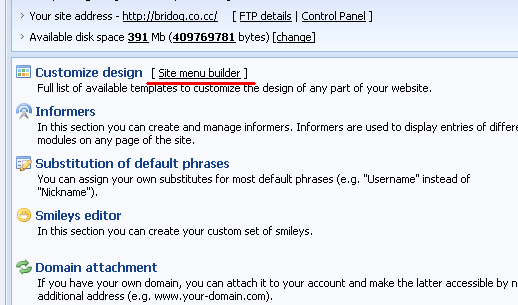
Go to Control Panel > [Site menu builder]
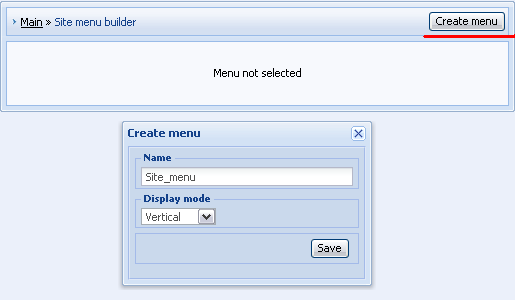
After you click on "Create menu" a new pop-up window will appear. Enter a name of your menu (e.g. "Site_menu"), select display mode (usually it is vertical) and click save.
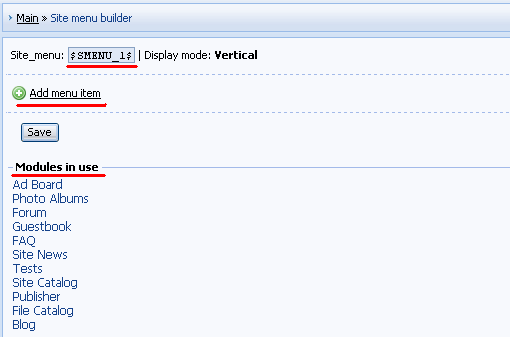
In "Site menu builder" you should pay attention to the following:

а) $SMENU_1$ - a code used in default templates to display site menu. A new created menu must have this $code$.
б) "+ Add menu item" – this link will call a pop-up window by means of which you can add menu items.
в) Under "Modules in use" you can see a list of all active modules. Click on a link to see url of a module.
Let's add "Ad Board" to our menu as an example.
First click on "Ad Board" in "Modules in use" and copy the url to the clipboard.
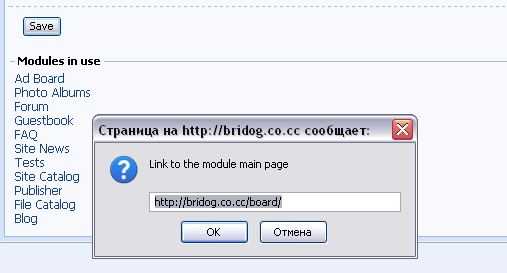
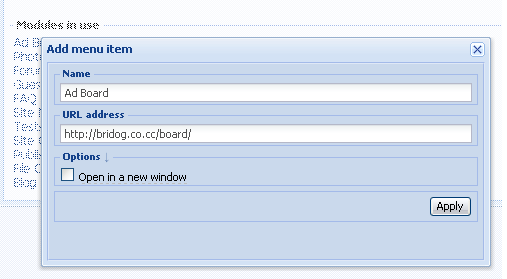
Then click on "+ Add menu item" and enter a name of the item and paste its url in a window that will appear. Click "Apply".
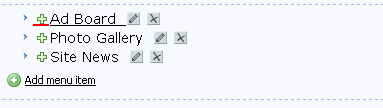
In the same way you can add other menu items.
To change the order of items drag them by means of a mouse.
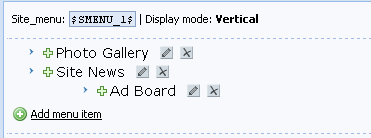
If you want to add a subitem, click on a cross near the necessary item and drag it on the item, under which you want it to appear:
After you have made all necessary changes don't forget to click "Save".
If your new menu doesn’t appear automatically you may need to resave the corresponding template (e.g. Top part of the website).

Video: http://ucool.ucoz.com/dir/3-1-0-2


I'm not "man", "sir" or whatever. I'm female!
About signatures, screenshots etc...
 
ChakraBlastDate: Thursday, 2009-09-24, 7:58 Am | Message # 76
Curious
Group: Checked
Messages: 25
Awards: 0
Reputation: 0
Status: Offline
i changed the old menu.how can i make an auto menu(whit all site pages)? dry

Added (2009-09-24, 7:58 Am)
---------------------------------------------
if this thing can't be done how can i view all the pages on my site? happy


-secondary site- Design # 853
Site1 Desing # 878
 
TommyDate: Thursday, 2009-09-24, 8:06 Am | Message # 77
Experienced
Group: Helpers
Messages: 438
Awards: 17
Reputation: 23
Status: Offline
Quote (ChakraBlast)
how can i view all the pages on my site?

Go to your Page Editor and there you can see all pages you created. By clicking on title, you will get linked to page.

"I don't like to commit myself about heaven and hell - you see, I have friends in both places"
 
ChakraBlastDate: Thursday, 2009-09-24, 8:07 Am | Message # 78
Curious
Group: Checked
Messages: 25
Awards: 0
Reputation: 0
Status: Offline
yeah...after i posted i've saw that 2....
but sunny.....is there really a way to make a Full menu????? surprised surprised surprised

-secondary site- Design # 853
Site1 Desing # 878
 
SunnyDate: Thursday, 2009-09-24, 8:10 Am | Message # 79
Haunter
Group: Administrators
Messages: 2016
Awards: 121
Reputation: 139
Status: Online
ChakraBlast, what do you mean by "full menu"?

I'm not "man", "sir" or whatever. I'm female!
About signatures, screenshots etc...
 
ChakraBlastDate: Thursday, 2009-09-24, 8:11 Am | Message # 80
Curious
Group: Checked
Messages: 25
Awards: 0
Reputation: 0
Status: Offline
all the pages of the syte to be automatyicaly inserted in the menu....like the first menu(when i created the site) dry

-secondary site- Design # 853
Site1 Desing # 878
 
TommyDate: Thursday, 2009-09-24, 8:11 Am | Message # 81
Experienced
Group: Helpers
Messages: 438
Awards: 17
Reputation: 23
Status: Offline
What you mean by full menu?. If you want to create a menu with all your site pages. Create a new menu, enter the menu name and it's url.

"I don't like to commit myself about heaven and hell - you see, I have friends in both places"
 
ChakraBlastDate: Thursday, 2009-09-24, 8:14 Am | Message # 82
Curious
Group: Checked
Messages: 25
Awards: 0
Reputation: 0
Status: Offline
what is that menu url?i don't have any menus i just want a menu that automatycaly includes any site page

-secondary site- Design # 853
Site1 Desing # 878
 
SunnyDate: Thursday, 2009-09-24, 8:28 Am | Message # 83
Haunter
Group: Administrators
Messages: 2016
Awards: 121
Reputation: 139
Status: Online
ChakraBlast, new site pages are added to the menu automatically.

I'm not "man", "sir" or whatever. I'm female!
About signatures, screenshots etc...
 
ChakraBlastDate: Saturday, 2009-09-26, 11:53 Am | Message # 84
Curious
Group: Checked
Messages: 25
Awards: 0
Reputation: 0
Status: Offline
i know but how about the old 1es.....?
eh it doesn't matter.i made it already. but how can i edit the size because is not fitting in right block
http://playmugen-nnd.ucoz.com/

-secondary site- Design # 853
Site1 Desing # 878


Message edited by ChakraBlast - Sunday, 2009-09-27, 6:02 Am
 
SunnyDate: Monday, 2009-09-28, 3:17 Am | Message # 85
Haunter
Group: Administrators
Messages: 2016
Awards: 121
Reputation: 139
Status: Online
ChakraBlast, this question should go here - http://www.forum.ucoz.com/forum/5

I'm not "man", "sir" or whatever. I'm female!
About signatures, screenshots etc...
 
Duke8954Date: Thursday, 2009-10-08, 1:14 Pm | Message # 86
Curious
Group: Checked
Messages: 20
Awards: 0
Reputation: 0
Status: Offline
hi, i created a new menu (sub one) but it doesn't show on the page.
$SMenu_2$ is code.
 
DartzDate: Thursday, 2009-10-08, 6:44 Pm | Message # 87
Cookie Monster
Group: Head Mod
Messages: 5961
Awards: 61
Status: Offline
Duke8954, did you insert it via builder?


*Yawn... drools on Renatus while sleeping...*
drunkenbirdDate: Tuesday, 2009-10-13, 7:25 Am | Message # 88
Curious
Group: Checked
Messages: 31
Awards: 0
Reputation: 0
Status: Offline
I wanted to put a Code into a Menue, since i couldnt to this, i added it into the Menu Box:
http://oldscool.at.ua/Temp/deleteme.bmp

But now is the Question, how i get the Sign (marked red) in the left of my Code? But if it's Possible, i would like it more, to input the Code directly under the menu. Basicly i just dont know where i find the Code which represents the $Menu$

I'm also interested, how i add such a Sign in front of my entries in Generally. Also including own Signs then.

 
SunnyDate: Tuesday, 2009-10-13, 8:21 Am | Message # 89
Haunter
Group: Administrators
Messages: 2016
Awards: 121
Reputation: 139
Status: Online
Quote (drunkenbird)
But if it's Possible, i would like it more, to input the Code directly under the menu. Basicly i just dont know where i find the Code which represents the $Menu$

$SMENU_1$ - that is the code of the menu. Depending on a design, it can be located in Top part of the website, The first container or The second container.

Quote (drunkenbird)
I'm also interested, how i add such a Sign in front of my entries in Generally.

That is a too general question. By means of editing templates. What templates? - It depends on a design and a module.


I'm not "man", "sir" or whatever. I'm female!
About signatures, screenshots etc...
 
drunkenbirdDate: Tuesday, 2009-10-13, 8:35 Am | Message # 90
Curious
Group: Checked
Messages: 31
Awards: 0
Reputation: 0
Status: Offline
Thanks for your Answhere, i dont search the $SMENU_1$ Code what i search is this Code
Code
<tbody><tr><td style="color: rgb(255, 255, 255); padding-left: 20px; padding-top: 15px;" height="35"><b><!-- <bt> -->Menu<!-- </bt> --></b></td></tr>
<tr><td style="padding: 5px 5px 5px 15px;"><!-- <bc> --><div id="uMenuDiv1" class="uMenuV" style="position: relative;"><ul class="uMenuRoot">
<li><div class="umn-tl"><div class="umn-tr"><div class="umn-tc"></div></div></div><div class="umn-ml"><div class="umn-mr"><div class="umn-mc"><div class="uMenuItem"><a class="uMenuItemA" href="/">News</a></div></div></div></div><div class="umn-bl"><div class="umn-br"><div class="umn-bc"><div class="umn-footer"></div></div></div></div></li>
<li><div class="umn-tl"><div class="umn-tr"><div class="umn-tc"></div></div></div><div class="umn-ml"><div class="umn-mr"><div class="umn-mc"><div class="uMenuItem"><a href="/index/0-2">OldSCool?</a></div></div></div></div><div class="umn-bl"><div class="umn-br"><div class="umn-bc"><div class="umn-footer"></div></div></div></div></li>
<li><div class="umn-tl"><div class="umn-tr"><div class="umn-tc"></div></div></div><div class="umn-ml"><div class="umn-mr"><div class="umn-mc"><div class="uMenuItem"><a href="/load">Filebase</a></div></div></div></div><div class="umn-bl"><div class="umn-br"><div class="umn-bc"><div class="umn-footer"></div></div></div></div></li>
<li><div class="umn-tl"><div class="umn-tr"><div class="umn-tc"></div></div></div><div class="umn-ml"><div class="umn-mr"><div class="umn-mc"><div class="uMenuItem"><a href="/forum">Forum</a></div></div></div></div><div class="umn-bl"><div class="umn-br"><div class="umn-bc"><div class="umn-footer"></div></div></div></div></li>
<li><div class="umn-tl"><div class="umn-tr"><div class="umn-tc"></div></div></div><div class="umn-ml"><div class="umn-mr"><div class="umn-mc"><div class="uMenuItem"><a href="/index/sc_flash/0-4">Starcraft Flashgame</a></div></div></div></div><div class="umn-bl"><div class="umn-br"><div class="umn-bc"><div class="umn-footer"></div></div></div></div></li></ul></div><script type="text/javascript">$(function(){_uBuildMenu('#uMenuDiv1',0,document.location.href+'/','uMenuItemA','uMenuArrow',2500);})</script><!-- </bc> -->
which is "behind" of $SMENU_1$

cause i wana add this Code

Code
<!--
Collapse Box
-->

<p>
<a href="#" onclick="collapse_menu(menu1, 0); return false">Starcraft Flashgames</a><br>
<span id="menu1"></span>

<script language="javascript">
var on_off=new Array();
var menu_code=new Array();
number_of_menus=1;
menu_code[0]="Starcraft FA 2<br>Starcraft FA 3<br>Starcraft FA 5<br>Starcraft FA 5 SE<br>Starcraft RPG<br>";
for (loop=0; loop<number_of_menus; loop++){
  on_off[loop]=0;
}

function collapse_menu(menu_id, menu_number){
  if (on_off[menu_number]==0){
  menu_id.innerHTML=menu_code[menu_number];
  on_off[menu_number]=1;
  }else{
  menu_id.innerHTML="";
  on_off[menu_number]=0;
  }
}
</script>

into there.

Quote (Sunny)
That is a too general question. By means of editing templates. What templates? - It depends on a design and a module.

So i have to ask this in the Design Section?

 
uCoz Community » uCoz System management and tuning » Page Editor » Site Menu Builder (how to create/edit a site menu)
Page 6 of 7«124567»
Search: