


   |
| uCoz Community » uCoz Modules » Page Editor » Site Menu Builder (How To Create/Edit Menu's) |
| Site Menu Builder |
If you want to add one more menu or edit the existing, follow this guide. Go to Control Panel > [Site menu builder] 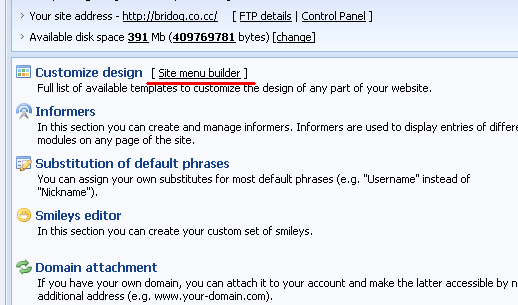 After you click on "Create menu" a new pop-up window will appear. Enter a name of your menu (e.g. "Site_menu"), select display mode (usually it is vertical) and click save. 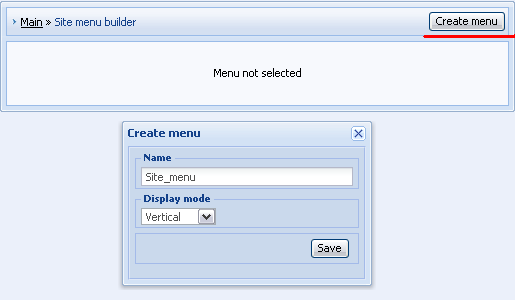 In "Site menu builder" you should pay attention to the following: а) $SMENU_1$ - a code used in default templates to display site menu. A new created menu must have this $code$. б) "+ Add menu item" – this link will call a pop-up window by means of which you can add menu items. в) Under "Modules in use" you can see a list of all active modules. Click on a link to see url of a module. 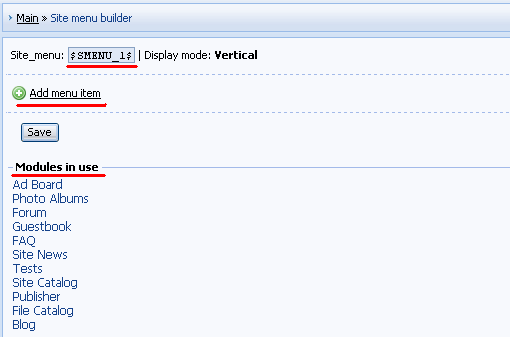 Let's add "Ad Board" to our menu as an example. First click on "Ad Board" in "Modules in use" and copy the url to the clipboard. 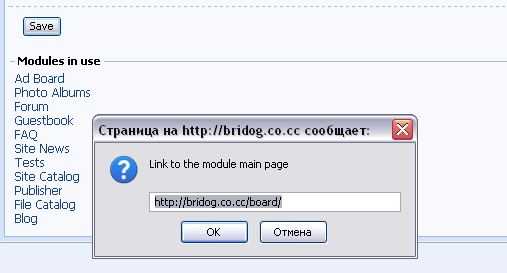 Then click on "+ Add menu item" and enter a name of the item and paste its url in a window that will appear. Click "Apply". 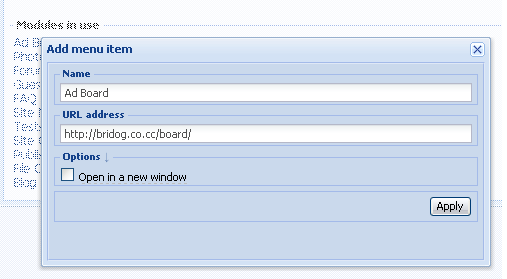 In the same way you can add other menu items. To change the order of items drag them by means of a mouse. If you want to add a subitem, click on a cross near the necessary item and drag it on the item, under which you want it to appear: 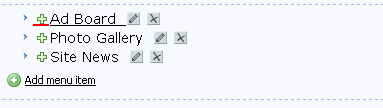 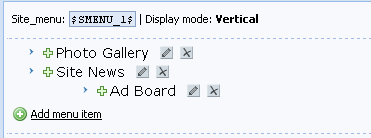 After you have made all necessary changes, please click "Save".
If your new menu doesn’t appear automatically you may need to resave the corresponding template (e.g. Top part of the website). Video: http://ucool.ucoz.com/dir/3-1-0-2 How to modify submenu styles: http://forum.ucoz.com/forum/38-11050-1 I'm not active on the forum anymore. Please contact other forum staff.
|
Quote (drunkenbird) But if it's Possible, i would like it more, to input the Code directly under the menu. Basicly i just dont know where i find the Code which represents the $Menu$ $SMENU_1$ - that is the code of the menu. Depending on a design, it can be located in Top part of the website, The first container or The second container.
Quote (drunkenbird) I'm also interested, how i add such a Sign in front of my entries in Generally. That is a too general question. By means of editing templates. What templates? - It depends on a design and a module. I'm not active on the forum anymore. Please contact other forum staff.
|
Thanks for your Answhere, i dont search the $SMENU_1$ Code what i search is this Code
Code <tbody><tr><td style="color: rgb(255, 255, 255); padding-left: 20px; padding-top: 15px;" height="35"><b><!-- <bt> -->Menu<!-- </bt> --></b></td></tr> <tr><td style="padding: 5px 5px 5px 15px;"><!-- <bc> --><div id="uMenuDiv1" class="uMenuV" style="position: relative;"><ul class="uMenuRoot"> <li><div class="umn-tl"><div class="umn-tr"><div class="umn-tc"></div></div></div><div class="umn-ml"><div class="umn-mr"><div class="umn-mc"><div class="uMenuItem"><a class="uMenuItemA" href="/">News</a></div></div></div></div><div class="umn-bl"><div class="umn-br"><div class="umn-bc"><div class="umn-footer"></div></div></div></div></li> <li><div class="umn-tl"><div class="umn-tr"><div class="umn-tc"></div></div></div><div class="umn-ml"><div class="umn-mr"><div class="umn-mc"><div class="uMenuItem"><a href="/index/0-2">OldSCool?</a></div></div></div></div><div class="umn-bl"><div class="umn-br"><div class="umn-bc"><div class="umn-footer"></div></div></div></div></li> <li><div class="umn-tl"><div class="umn-tr"><div class="umn-tc"></div></div></div><div class="umn-ml"><div class="umn-mr"><div class="umn-mc"><div class="uMenuItem"><a href="/load">Filebase</a></div></div></div></div><div class="umn-bl"><div class="umn-br"><div class="umn-bc"><div class="umn-footer"></div></div></div></div></li> <li><div class="umn-tl"><div class="umn-tr"><div class="umn-tc"></div></div></div><div class="umn-ml"><div class="umn-mr"><div class="umn-mc"><div class="uMenuItem"><a href="/forum">Forum</a></div></div></div></div><div class="umn-bl"><div class="umn-br"><div class="umn-bc"><div class="umn-footer"></div></div></div></div></li> <li><div class="umn-tl"><div class="umn-tr"><div class="umn-tc"></div></div></div><div class="umn-ml"><div class="umn-mr"><div class="umn-mc"><div class="uMenuItem"><a href="/index/sc_flash/0-4">Starcraft Flashgame</a></div></div></div></div><div class="umn-bl"><div class="umn-br"><div class="umn-bc"><div class="umn-footer"></div></div></div></div></li></ul></div><script type="text/javascript">$(function(){_uBuildMenu('#uMenuDiv1',0,document.location.href+'/','uMenuItemA','uMenuArrow',2500);})</script><!-- </bc> --> cause i wana add this Code Code <!-- Collapse Box --> <p> <a href="#" onclick="collapse_menu(menu1, 0); return false">Starcraft Flashgames</a><br> <span id="menu1"></span> <script language="javascript"> var on_off=new Array(); var menu_code=new Array(); number_of_menus=1; menu_code[0]="Starcraft FA 2<br>Starcraft FA 3<br>Starcraft FA 5<br>Starcraft FA 5 SE<br>Starcraft RPG<br>"; for (loop=0; loop<number_of_menus; loop++){ on_off[loop]=0; } function collapse_menu(menu_id, menu_number){ if (on_off[menu_number]==0){ menu_id.innerHTML=menu_code[menu_number]; on_off[menu_number]=1; }else{ menu_id.innerHTML=""; on_off[menu_number]=0; } } </script> into there.
Quote (Sunny) That is a too general question. By means of editing templates. What templates? - It depends on a design and a module. So i have to ask this in the Design Section? |
Hey. I want to make a page which has it's own menu. but i'm not being able to do it.
So, what I want to do is, I want to have my main menu with: "Forum, Blog, Gallery, Vids..." And then, In a specific page, I want to hide my Main menu and only display one other menu made by me to that situation. Let's say the custom page is about skateboard. I wouldnt like to have my main menu on that page. I'd only like to have a menu saying "Trucks, Boards, Helmets..." with the main one hide. How can I do that?? Thanks |
ShiFT, you need to create one more menu via Site Menu Builder. Then use Conditional operators to hide from that page the main menu and to display the second one.
I'm not active on the forum anymore. Please contact other forum staff.
|
1. CP -> Site menu builder -> Create menu -> Add necessary links -> Save
2. CP -> Customize Design -> the template where the menu code ($SMENU_1$) is located (it may be Top part of the website, The first container, The second container - depends on the design). 3. Here you need to use conditional operators. You need smth like this:
Quote <?if($PAGE_ID$='sitePage1')?>$SMENU_2$<?else?>$SMENU_1$<?endif?> Page ID can be viewed in Admin Bar on the corresponding page of the site: Builder -> List of page variables. Examine the thread about conditional operators and have a try. I'm not active on the forum anymore. Please contact other forum staff.
|
Quote (Sunny) 1. CP -> Site menu builder -> Create menu -> Add necessary links -> Save 2. CP -> Customize Design -> the template where the menu code ($SMENU_1$) is located (it may be Top part of the website, The first container, The second container - depends on the design). 3. Here you need to use conditional operators. You need smth like this: Quote Page ID can be viewed in Admin Bar on the corresponding page of the site: Builder -> List of page variables. Examine the thread about conditional operators and have a try. Thanks |
Dodolidot, this question is not related to Site Menu. Ask it on Design Customization ( http://www.forum.ucoz.com/forum/5 ) in the thread about your design number.
I'm not active on the forum anymore. Please contact other forum staff.
|
I wonder, how can I change the style of the submenus, I read this thread (http://forum.ucoz.com/forum/26-7672-1), but the link provided by Sunny, is not working anymore.
Thank's in advance. I've made grammar mistakes ?? Google's fault !!
Time is the most valuable thing a man can spend. |
Hi! I've browsed through this thread and found out that this question wasn't asked yet.
How do you put the music player below the site menu? This website has a music player below the menus (it'll take some time before you can see it) and I was wondering how to do it. Can someone help me? And yeah, I know the codes for the music player, I just don't know how to put it below the site menu. ^^; Post edited by TuckingFypo - Thursday, 2009-12-03, 10:15 AM
|




| |||